
Introducing MakeFun AI Avatar MCP Server: Enabling AI-Avatar Functions for Vibe Coding
MakeFun.ai, a pioneer in AI-driven avatar generation, announces a paradigm shift in developer tooling with its new AI Avatar MCP Server – a popular technology that enables AI coding assistants to automate code creation for complex AI avatar systems through deep API understanding.
Our AI Avatar MCP Server, powered by apidog, establishes a dynamic bridge between:
- AI Coding Tools (LLM-powered IDEs)
- MakeFun’s Avatar Generation API Ecosystem
- Project-Specific Implementation Requirements
This neural conduit enables autonomous code generation that respects both platform capabilities and project constraints
Activating MCP Server in Your Workflow

Prerequisites
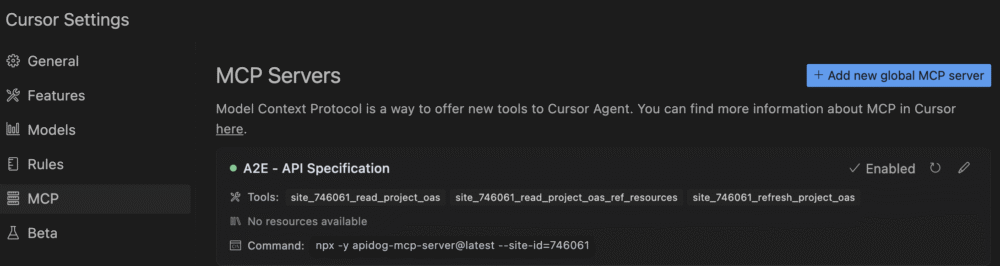
Node.js (version 18 or higher, preferably the latest LTS version).An IDE that supports MCP, such as: Cursor, or VS Code + Cline plugin
Configure the IDE
Copy the following JSON configuration code to add to the MCP configuration file in your IDE:
{
  "mcpServers": {
    "MakeFun - API Specification": {
      "command": "npx",
      "args": [
        "-y",
        "apidog-mcp-server@latest",
        "--site-id=746061"
      ]
    }
  }
}
If you’re on Windows and the configuration file above isn’t working, try using the configuration file below instead:
{
  "mcpServers": {
    "MakeFun - API Specification": {
      "command": "cmd",
      "args": [
        "/c",
        "npx",
        "-y",
        "apidog-mcp-server@latest",
        "--site-id=746061"
      ]
    }
  }
}
A Cursor Example

Following the steps in the previous section to enable the MakeFun MCP server in Cursor. Then create an empty python file. Send a request to Cursor for “write a sample code to list all avatars of MakeFun and generate a video of a random publich figure” . Here is the code AI writes within 5 seconds:
import os
import random
import requests

def list_makefun_avatars():
    """
    Function to list all available avatars from MakeFun API
    Returns a list of avatar information
    """
    try:
        # Make API request to get avatars
        response = requests.get("https://api.makefun.ai/v1/avatars")
        response.raise_for_status()

        # Parse JSON response
        avatars = response.json()

        print(f"Found {len(avatars)} avatars:")
        for i, avatar in enumerate(avatars):
            print(f"{i+1}. {avatar['name']} (ID: {avatar['id']})")

        return avatars
    except Exception as e:
        print(f"Error fetching avatars: {str(e)}")
        return []

def generate_public_figure_video(prompt=None, output_path="./generated_video.mp4"):
    """
    Generate a video of a random public figure using MakeFun API

    Args:
        prompt (str, optional): Custom prompt. If None, a default will be used
        output_path (str): Path to save the generated video

    Returns:
        str: Path to the generated video file
    """
    # List of public figures to choose from
    public_figures = [
        "Elon Musk", "Barack Obama", "Taylor Swift", "Leonardo DiCaprio",
        "Oprah Winfrey", "Bill Gates", "Beyoncé", "Tom Hanks"
    ]

    # Select a random public figure
    figure = random.choice(public_figures)

    # Default prompt if none provided
    if prompt is None:
        prompt = f"{figure} giving a short speech about artificial intelligence"

    print(f"Generating video for: {prompt}")

    try:
        # Get available avatars
        avatars = list_makefun_avatars()
        if not avatars:
            raise Exception("No avatars available")

        # Select a random avatar
        avatar = random.choice(avatars)
        avatar_id = avatar['id']

        print(f"Using avatar: {avatar['name']} (ID: {avatar_id})")

        # API request to generate video
        api_key = os.environ.get("MakeFun_API_KEY")
        if not api_key:
            raise Exception("MakeFun_API_KEY environment variable not set")

        headers = {
            "Authorization": f"Bearer {api_key}",
            "Content-Type": "application/json"
        }

        payload = {
            "avatar_id": avatar_id,
            "prompt": prompt,
            "settings": {
                "quality": "high",
                "duration": 15  # seconds
            }
        }

        # Make API request
        response = requests.post(
            "https://api.makefun.ai/v1/generate",
            headers=headers,
            json=payload
        )
        response.raise_for_status()

        # Get generation ID from response
        generation_id = response.json().get("generation_id")
        if not generation_id:
            raise Exception("No generation ID returned")

        print(f"Generation started with ID: {generation_id}")

        # Poll for completion
        status = "pending"
        while status in ["pending", "processing"]:
            status_response = requests.get(
                f"https://api.makefun.ai/v1/generations/{generation_id}",
                headers=headers
            )
            status_response.raise_for_status()

            status_data = status_response.json()
            status = status_data.get("status")

            print(f"Generation status: {status}")

            if status == "completed":
                video_url = status_data.get("video_url")
                if not video_url:
                    raise Exception("No video URL in completed response")

                # Download the video
                video_response = requests.get(video_url)
                video_response.raise_for_status()

                with open(output_path, "wb") as f:
                    f.write(video_response.content)

                print(f"Video saved to: {output_path}")
                return output_path

            elif status == "failed":
                raise Exception(f"Generation failed: {status_data.get('error')}")

            # Wait before polling again
            import time
            time.sleep(5)

    except Exception as e:
        print(f"Error generating video: {str(e)}")
        return None

# Example usage
if __name__ == "__main__":
    # List all available avatars
    avatars = list_makefun_avatars()

    # Generate a video with a random public figure
    video_path = generate_public_figure_video(
        prompt="A public figure discussing the future of AI technology",
        output_path="./public_figure_video.mp4"
    )

    if video_path:
        print(f"Successfully generated video at: {video_path}")
    else:
        print("Failed to generate video")
MakeFun’s latest innovation marks a new chapter in AI-driven development. Whether you’re creating complex digital avatars or optimizing your coding workflow, this powerful tool makes the process faster, smarter, and more intuitive. Try it today and see how it can transform your next project.


