
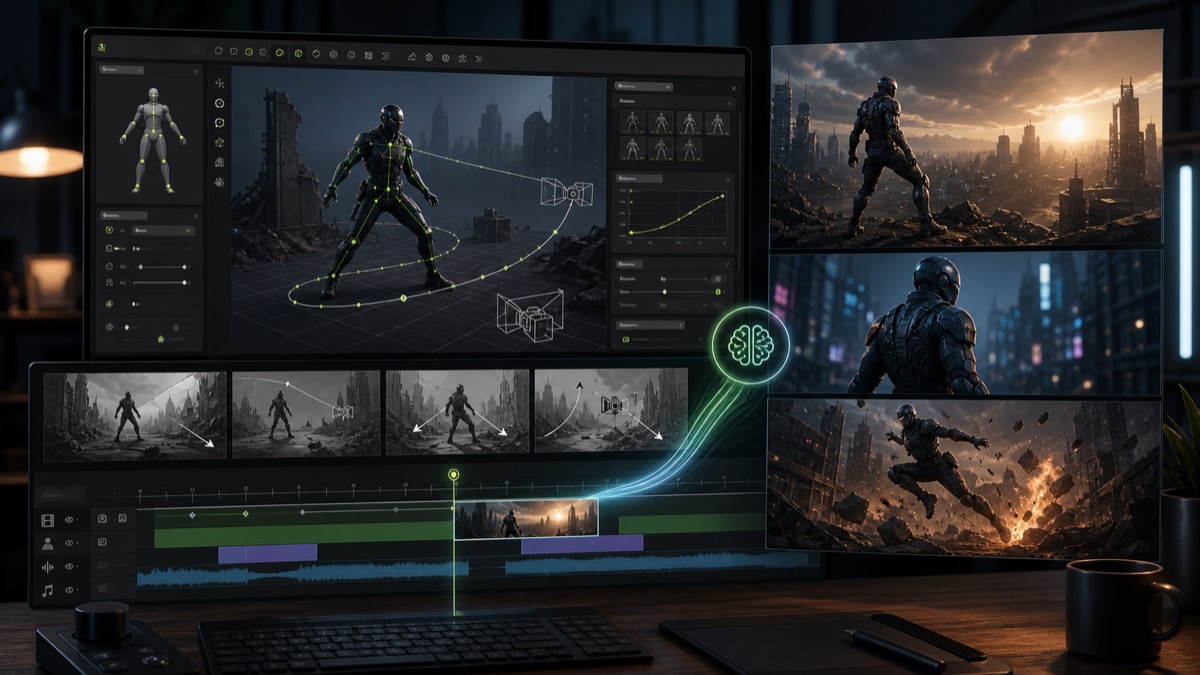
Reallusion AI Studio is a timely AI video generator topic because it connects two search themes that are converging in 2026: cinematic generative video and creator-controlled 3D staging. Instead of treating AI video as a one-prompt black box, the Reallusion workflow uses 3D characters, camera setup, pose control, and storyboard review to guide the final AI video output.
That makes the opportunity relevant for Makefun readers who already compare image-to-video AI workflows, agentic video generation, Seedance 2.0 video generation, and production tools such as AI video creation in MakeFun. The long-tail keyword fit is clear: Reallusion AI Studio, 3D to video AI, AI video generator with 3D control, and Seedance 2.0 creator workflow.
What Reallusion AI Studio Adds
Reallusion announced AI Studio in May 2026 as part of a creative alliance with ByteDance’s Seedance 2.0. The core positioning is practical: creators can build or stage a scene in a 3D environment, control character motion and camera direction, then generate cinematic video from that structured setup.
This is a different search intent from a simple text-to-video prompt. A creator who searches for Reallusion AI Studio is likely asking how to keep a character, pose, product placement, or camera move consistent while still getting the speed and polish of AI video generation.
Why 3D Control Matters for AI Video
AI video models are improving quickly, but prompt-only workflows still create production friction. A team may get strong motion in one generation and lose the exact body pose, camera angle, product view, or scene continuity in the next. Reallusion’s angle is to put a controllable 3D layer before generation, so the AI model starts from a more specific creative plan.
- Character staging: pose and motion intent can be planned before generation.
- Camera direction: shots can be framed with a clearer path than a text prompt alone.
- Storyboard review: teams can align on scene structure before spending generation credits.
- Model handoff: Seedance 2.0 becomes part of a workflow rather than the whole workflow.
Competitor and Search Context
The competitor pattern is broader than Reallusion alone. Pollo, OpenArt, Higgsfield, PixVerse, Runway, and Makefun-style all-in-one workspaces increasingly compete on model access plus workflow control. Some pages emphasize one model, while others emphasize character consistency, image-to-video control, agent workflows, or production pipelines.
Reallusion AI Studio sits on the control-heavy side of that market. It is especially relevant for animation teams, virtual production creators, product video teams, educators, and social video producers who need repeatable staging rather than a one-off cinematic clip.
How to Evaluate the Workflow
For creators comparing AI video tools, the practical question is not only which model looks best. It is whether the workflow makes revisions easier. A 3D-guided setup can help when a video needs the same character, object, or camera logic across multiple shots. A prompt-only or image-to-video workflow may be faster when the creator only needs one short clip or a simple product motion test.
The safest way to frame Reallusion AI Studio for SEO is as a workflow signal, not as a guarantee that every output will be production-ready. It shows where AI video search demand is going: more control, more previsualization, and clearer handoffs between scene planning and video generation.
Evidence Sources
- Reallusion AI Studio announcement on PRNewswire
- Reallusion AI Studio product page
- Reallusion AI Studio 3D-to-video documentation
FAQ
What is Reallusion AI Studio?
Reallusion AI Studio is an AI video creation workflow that combines 3D scene control with generative video output, including workflows connected to Seedance 2.0.
Why is 3D-to-video useful for AI video creators?
3D-to-video workflows can give creators more control over pose, camera, staging, and continuity before an AI video model generates the final clip.
How does Reallusion AI Studio fit beside image-to-video tools?
Image-to-video tools are fast for animating a visual reference. Reallusion AI Studio is better framed as a control-first workflow for creators who want to plan characters, camera movement, and scenes before generation.


