
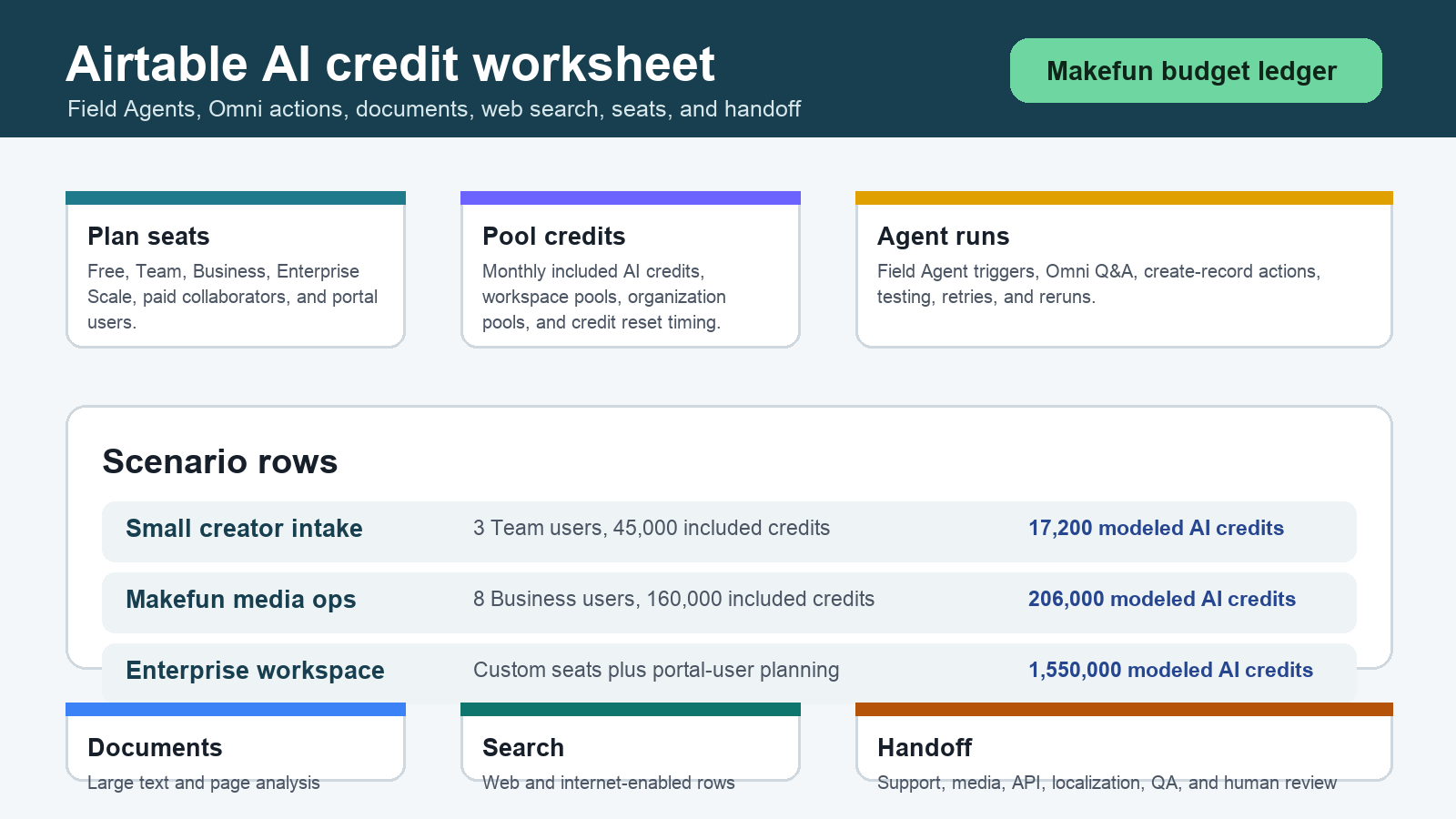
As of June 4, 2026, Airtable AI cost should be modeled as a pooled-credit ledger layered on top of Airtable seat pricing. A Field Agent workflow can draw from included monthly AI credits, billable collaborator seats, portal-user credits, extra credit packs, Omni actions, record-triggered agent runs, document analysis, web search, image generation, internet-enabled responses, testing, retries, and human or Makefun workflow handoff. Refresh Airtable billing docs before using this worksheet for a purchase decision.
Publication-time checks used the official Airtable AI billing, Airtable pricing, and Airtable AI Agents pages. Those pages are the source of truth because plan prices, included credits, portal-user behavior, credit packs, model behavior, internet access, and enterprise terms can change independently.
Airtable AI billing source snapshot
| Cost row | What to model | Budget caveat |
|---|---|---|
| Seats | Free, Team, Business, and Enterprise Scale plan route, billable collaborators, and billing cadence. | The June 4 snapshot uses Team at $20/user/month billed annually, Business at $45/user/month billed annually, and Enterprise Scale as custom pricing. |
| Included AI credits | Monthly credits by plan, workspace or organization pooling, and portal-user credit rows. | Credits reset and can be consumed by users, agents, and AI actions across the pool. |
| Extra credit packs | Current credit-pack tiers and whether the team buys monthly or annual capacity. | Use credit packs as planning rows, not as proof that the workflow is cheaper than another tool. |
| Field Agents and Omni | Record-triggered Field Agent runs, Omni Q&A;, create-record actions, feedback categorization, and testing. | Automatic runs when data is added or updated can consume credits faster than manual usage suggests. |
| Documents and web | Document analysis, large text, web search, internet-enabled responses, and image generation. | Long documents, external text, model choice, and retries can change usage. |
Plan included-credit and pooled-credit rows
Start with the Airtable plan and paid users, then add the included AI credit pool for the current plan. Keep portal-user credits separate from paid-user credits unless the current contract and docs confirm how they pool. This avoids mixing seat cost with AI action cost and makes it easier to see when a Field Agent workflow is budgeted by usage rather than by the team owner.
Extra credit pack rows
Add a separate row for any extra AI credit pack. The useful question is not whether a pack exists; it is how often the team crosses the included pool after record updates, testing, document analysis, web search, and image generation. Keep monthly and annual treatment explicit because buyers can otherwise understate overage planning.
Field Agent trigger and Omni action rows
Count Field Agents by base, trigger, and records processed per month. Then add Omni Q&A;, create-record actions, feedback categorization, retry runs, and pre-launch testing. A small manual demo may use a few credits, while an automatic trigger on every added or updated record can turn the same workflow into a recurring operating cost.
Document analysis, web search, image generation, and internet-access rows
Document count, page count, large-text size, web-search frequency, internet-enabled answer length, and image generation should sit in their own rows. These are the rows most likely to surprise a team that thinks of Airtable AI as only a chat helper. They also matter for privacy review because the workflow may include creator briefs, customer support notes, product feedback, attachments, or connected records.
Three scenario calculator
| Scenario | Assumptions | Worksheet result |
|---|---|---|
| Small creator-intake base | Team plan with 3 billable collaborators, 45,000 included monthly AI credits, 4,000 feedback-categorization runs, 500 Omni Q&A; runs, 120 web-search runs, 30 document-analysis runs, and 100 test or retry runs. | Seat baseline is 3 x $20/user/month billed annually = $60/month. Modeled AI usage is 17,200 credits, so no extra pack is needed if other workspace usage stays below the pooled allowance. |
| Makefun media operations workflow | Business plan with 8 paid users, 160,000 included monthly AI credits, 12,000 routing runs, 3,000 Omni Q&A;/create-record runs, 1,000 web-search runs, 350 document-analysis runs, 80 large-document runs, and 400 testing/retry runs. | Seat baseline is 8 x $45/user/month billed annually = $360/month. Modeled AI usage is 206,000 credits, so plan one 50,000-credit annual-pack-equivalent row or the current self-serve monthly/annual pack option confirmed at publication time. |
| Enterprise operations workspace | Enterprise Scale custom plan with 60 paid users, portal-user planning, 75,000 categorization runs, 20,000 Omni Q&A;/create-record runs, 6,000 web-search runs, 2,000 document-analysis runs, 400 large-document runs, and 1,500 test/retry runs. | Seat cost is custom. Modeled AI usage is 1,550,000 credits before other workspace AI usage, so the buyer should refresh contract-specific credit treatment and governance terms before rollout. |
Same-use competitor worksheet
Compare Airtable only against the same workflow: operations database, record triggers, document review, web research, campaign intake, support triage, and handoff. Adjacent Makefun worksheets and governance pages include GitHub Copilot AI Credits agent costs, CopilotKit AG-UI frontend cost governance, AWS Bedrock AgentCore cost governance, Comfy Cloud API workflow costs, LiveKit agents voice and video costs, and Deepgram voice agent Aura-2 costs. Do not use this article to claim Airtable is cheapest, best, safer, or more accurate than another platform without a current same-scenario source check.
Makefun support, media, API, and localization handoff worksheet
For Makefun-style operations, add handoff rows for creator intake, API status triage, video or avatar follow-up, localization review, media QA, and human escalation. Airtable can organize the records, but the budget should still separate Airtable AI credits from Makefun-owned media generation, API debugging, support review, and final human decisions.
Risks and caveats
- Refresh official Airtable billing and pricing before publishing a quote, procurement note, or customer-facing budget.
- Keep pooled-credit draw visible because many users and agents can spend the same pool.
- Count testing, retries, and record-update triggers, not only successful production runs.
- Review privacy, connected-record scope, admin controls, model choice, and internet access before adding customer or creator data.
- Keep human QA and Makefun workflow handoff as separate operational rows.
FAQ
Are Airtable AI credits pooled?
Airtable’s AI billing docs describe pooled AI credits by plan or organization context. Treat the pool as shared capacity, then confirm the current plan and contract before budgeting a rollout.
Do Field Agents consume credits automatically?
Field Agent workflows can run when records are added or updated, so automatic triggers, testing, and retries need their own credit rows.
What makes document analysis expensive?
Document count, page count, large-text size, model behavior, internet-enabled responses, and reprocessing can all increase credit usage. Model documents separately from short Q&A.;
What should a team do when credits run out?
First identify which users, agents, and actions consumed the pool. Then decide whether to reduce triggers, shorten document or web-search work, add governance, buy a credit pack, or route repeated work into a Makefun-owned workflow.


