
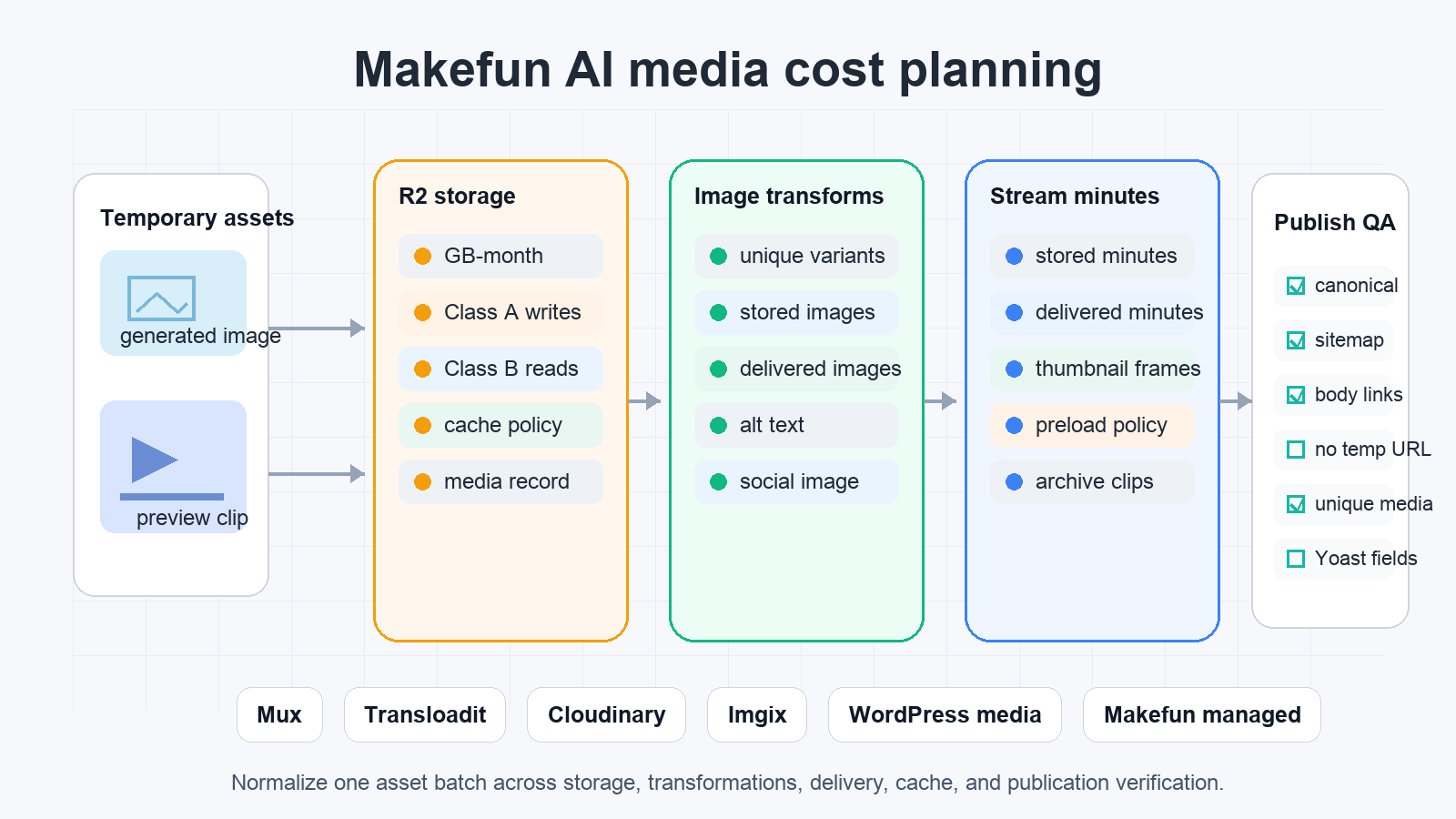

Cloudflare media cost planning is not just a storage line item. For an AI generated asset workflow, the useful calculator starts with the batch: how many original images or clips are permanent, how many variants are created, how often users request those variants, whether video playback minutes matter, and how much editorial verification Makefun must do before the page is safe to publish.
Use this worksheet when a generated image, thumbnail, preview clip, or short archive video must move from a temporary model result into a durable publishing path. The goal is not to declare Cloudflare, Mux, Cloudinary, Imgix, Transloadit, WordPress media, or a Makefun managed script the universal winner. The goal is to normalize the same batch across billing units and publication checks.
Cloudflare media cost answer in one paragraph
Use R2 plus Images when Makefun wants original files in object storage and pays mainly for object storage, operations, and unique transformations. Use Cloudflare Images hosted storage when the asset library fits stored-image and delivered-image billing. Use Stream when the object is truly a video experience with stored and delivered minutes. Keep WordPress media or a Makefun managed pipeline in the plan when editorial metadata, featured image uniqueness, Yoast social images, cache behavior, and verifier handoff are the controlling constraints.
Official source snapshot
Publication-time source refresh on 2026-06-06 confirmed the current official Cloudflare pricing pages are reachable for R2 pricing, Cloudflare Images pricing, and Cloudflare Stream pricing. Those pages are the source of truth for current units and examples, so a production calculator should refresh them before reusing numeric rows.
- R2 planning starts with storage GB-month, Class A operations such as writes and lists, Class B operations such as reads and heads, any retrieval unit that applies to the chosen storage class, and the fact that free egress does not erase other metered services.
- Images planning separates remote transformations, stored images, delivered images, variants, cache behavior, and whether Makefun is storing originals elsewhere.
- Stream planning uses uploaded video minutes, stored minutes, delivered minutes, playback behavior, preloading, downloads, and any image or media transformation work used for thumbnails and derivatives.
R2 plus Images transformation worksheet
Start with one batch of 5,000 generated hero images at 5 MB each. R2 storage covers the original files. Class A operations cover writes, lists, and lifecycle work. Class B operations cover reads, heads, and checks from the publication or verification pipeline. If Images transforms 2,000 originals into five output variants, the relevant row is unique transformation combinations, not just request count. Repeat requests may be cached, but the worksheet should still include origin reads, transformation uniqueness, and any Worker or script that sits in the path.
This is the closest Cloudflare route to a Makefun-owned permanent asset store: originals stay under a durable object key, variants are generated as needed, and WordPress receives a permanent media record or final uploaded image rather than a temporary model URL. It is also the route where teams most often overclaim savings by saying egress is free while ignoring reads, writes, transformations, cache misses, and review labor.
Cloudflare Images hosted storage and delivery worksheet
For a hosted image library, change the worksheet inputs. Use stored-image count, delivered-image count, upload or import path, predefined variant policy, deletion policy, and how alt text or social images are recorded. This can be simpler than R2 plus a custom transformation layer when Cloudflare Images owns storage and delivery directly, but it may be less flexible if Makefun needs object-level governance or custom processing around the originals.
The same batch should be compared against Cloudinary transformation-credit planning and Imgix delivery and transformation planning. Those alternatives may price by different transformation, delivery, storage, or bandwidth units, so the comparison only works if the image count, variant count, cache assumptions, and quality requirements are identical.
Cloudflare Stream stored and delivered minute worksheet
For 100 generated preview clips at 30 seconds each, storage and delivery move from image units into minute units. The worksheet should include total stored minutes, monthly delivered minutes, client preloading, failed or deleted assets, MP4 download expectations, thumbnail extraction, and whether Stream is providing a real playback experience or just hosting a short preview that WordPress could serve as a static asset.
Compare this row with Mux video storage and delivery planning, Shotstack render-minute planning, Creatomate render-credit planning, and Transloadit robot GB processing. Rendering credits, processing GB, stored minutes, delivered minutes, and permanent hosting are separate obligations even when a vendor output URL looks convenient.
Same-use comparison matrix
- Generated hero images: compare R2 plus Images, Cloudflare Images, Cloudinary, Imgix, WordPress media plus CDN, and Makefun managed processing with the same original count and variant policy.
- Generated thumbnails: include transformation uniqueness, cache repeats, source reads, social-image crops, and whether the thumbnail is stored as a WordPress media attachment.
- Short preview clips: compare Stream, Mux, Shotstack, Creatomate, Transloadit, and Makefun FFmpeg scripts using stored minutes, delivered minutes, render cost, and publication review time.
- Archive assets: include retention, deletion, cache purge, REST media metadata, sitemap checks, and whether the public URL is durable enough for a long-lived blog post.
Makefun publication governance
A cheap media route is not publish-ready if it produces a temporary URL, a repeated generic featured image, a copied vendor UI, or missing metadata. The Publisher gate for this page required a unique topic-specific PNG, WordPress media registration, alt text, caption, category blog id 2, Yoast title and description, official source links, internal links, canonical checks, cache-busted checks, sitemap checks, and a scan for temporary MakeFun or signed media markers.
This is why Cloudflare cost planning belongs in the same decision as publication QA. A Makefun article can be technically created in WordPress but still be held if the bare canonical URL is stale, the sitemap omits the post, the media is generic, or the public HTML leaks a temporary result URL. Storage and transformation choices should reduce that operational risk, not just the hosting invoice.
Decision matrix
- Choose R2 plus Images when originals must stay Makefun-owned and variants are transformation-led.
- Choose Cloudflare Images hosted storage when stored-image and delivered-image units match the product workflow and metadata plan.
- Choose Stream when the asset is a real playback object with meaningful stored and delivered minutes.
- Choose WordPress media when the main job is editorial permanence, featured image uniqueness, alt text, captions, Yoast social images, and verifier ownership.
- Choose a Makefun managed pipeline when custom scripts, Sharp, FFmpeg, review queues, and post-publish verification matter more than one vendor console.
Risk controls and Publisher checklist
- Refresh official pricing pages immediately before numeric claims or worksheet reuse.
- Do not claim free R2 egress makes media serving free; include operations, transformations, delivery units, Workers or scripts, and human QA.
- Do not declare a cheapest, fastest, or best winner without same-date, same-input evidence.
- Never publish temporary MakeFun URLs, signed URLs, copied pricing tables, provider screenshots, brand logos, or media ID 7037 as the featured image.
- Verify the WordPress REST post, category, featured media, canonical URL, cache-busted URL, sitemap entry, Yoast fields, source links, internal links, and temporary media markers after publishing.
FAQ
Is Cloudflare R2 free egress enough to make media hosting free?
No. R2 egress can be free, but the worksheet still needs storage GB-month, Class A writes, Class B reads, Images transformations, hosted Images storage and delivery, Stream delivered minutes, Workers or other metered services, and human QA.
When should Makefun use R2 plus Images instead of Cloudflare Images storage?
Use R2 plus Images when Makefun wants original assets in object storage and mostly pays for unique transformations. Use Images storage when Cloudflare-hosted image storage and delivered-image units match the workflow and metadata plan.
When does Cloudflare Stream belong in the calculator?
Use Stream when the asset is a real video playback object with stored and delivered minutes. For static thumbnails, hero images, or still frames, Images, R2, WordPress media, or a Makefun-managed thumbnail pipeline may be more appropriate.
Can Publisher publish before a generated featured image file exists?
Publisher may own generation, upload, and registration if the brief carries a unique, safe, permanent media plan. The final published page must use permanent site-owned media and must not leak temporary generation URLs.


