
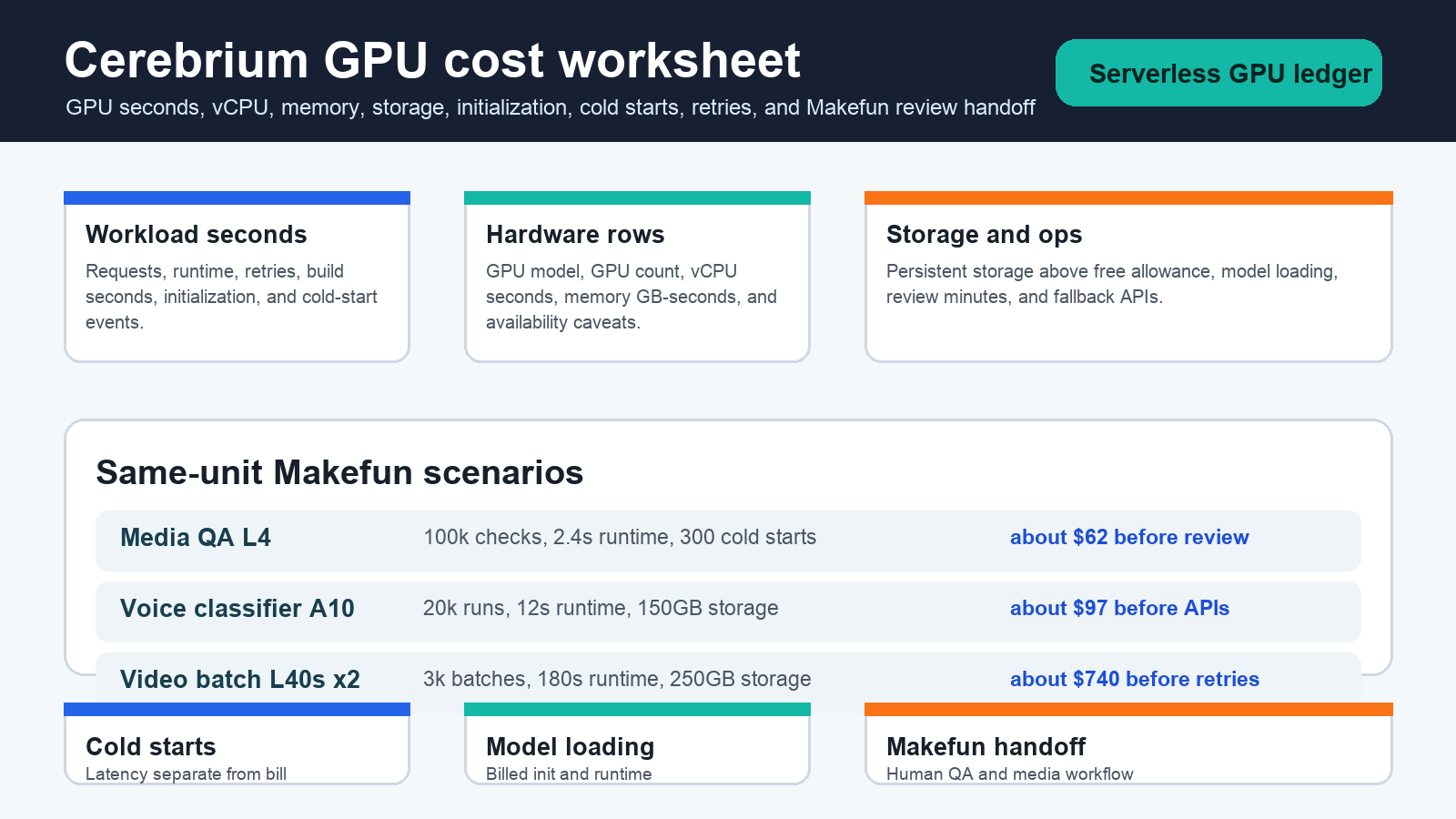
As of June 4, 2026, Cerebrium pricing is best modeled as a workload-second worksheet, not as a generic serverless GPU headline. Start with the active function runtime, add billed model initialization and build or deploy work, multiply GPU seconds by GPU count, add vCPU seconds and memory GB-seconds, then include persistent storage above the free allowance, retries, and Makefun review labor. Cold-start latency still matters operationally, but the official cost docs separate cold-start time from the billed model-initialization and function-runtime rows.
Publication-time source refresh used the official Cerebrium pricing page, Cerebrium calculating compute cost docs, Using GPUs docs, and Faster Cold Starts docs. Those pages are the source of truth because GPU availability, plan limits, storage terms, region and provider support, and exact hardware rows can change.
Cerebrium official pricing source snapshot
| Cost row | What to model | Budget caveat |
|---|---|---|
| GPU compute | GPU model, per-second GPU row, function runtime, model initialization, build seconds, and GPU count. | Multi-GPU workloads must multiply the GPU row by configured GPU count and account for availability by provider and region. |
| vCPU and memory | vCPU seconds and memory GB-seconds during the billed execution window. | Do not compare GPU-only headline rates without adding CPU and memory rows. |
| Persistent storage | Storage GB-months above the included allowance, model-loading strategy, and data kept between runs. | Storage can be small for short checks and material for large media or model-weight workflows. |
| Cold starts | Cold-start events, initialization time, model-loading method, container versus storage-volume loading, and Tensorizer fit. | Cold-start latency is an operational row even where the billing row is model initialization plus runtime. |
| Makefun operations | Retries, failed outputs, human QA, editorial review, fallback APIs, and workflow handoff. | Provider compute can be only one part of the approved media or support-workflow cost. |
GPU-second and vCPU-second worksheet
The core worksheet is: billed seconds multiplied by GPU row and GPU count, plus billed seconds multiplied by vCPU row, plus billed seconds multiplied by memory GB row. The queue package used three publication-time scenarios: L4 media checks, A10 voice or support classifiers, and two-L40s batch preprocessing. Each scenario keeps runtime, initialization, build work, storage, retry rate, and review labor visible so a team can tell whether the bottleneck is compute, model loading, failed output, or downstream operations.
Three same-unit Makefun scenarios
| Scenario | Cerebrium rows | Planning takeaway |
|---|---|---|
| Makefun media QA short GPU checks on L4 | 100,000 monthly requests, 2.4 second runtime, 300 cold starts, 4 second billed model initialization, 120 build seconds, 2 vCPU, 10GB memory, and storage under the free allowance. | The approximate provider-compute worksheet is about $62 before external APIs, failed-output handling, and reviewer labor. |
| Voice, transcription, or support classifier on A10 | 20,000 runs, 12 second runtime, 600 cold starts, 8 second initialization, 300 build seconds, 4 vCPU, 24GB memory, and 150GB persistent storage. | The approximate worksheet is about $97 before external APIs and QA, with storage and model-loading choices becoming visible. |
| Multi-GPU video or image preprocessing | 3,000 batches, 180 second runtime, 90 cold starts, 25 second initialization, 900 build seconds, two L40s GPUs, 8 vCPU, 96GB memory, and 250GB persistent storage. | The approximate worksheet is about $740 before reviewer labor and retries, so capacity, availability, and failed-output rate matter as much as the hardware row. |
Cold-start, initialization, and function-runtime rows
Cold starts should not be hidden in a generic GPU price. Use one row for cold-start count and latency impact, one row for billed model initialization, and one row for function runtime. Cerebrium’s cold-start guidance points teams toward container-loaded weights, storage-volume loading, CPU parallelization, and Tensorizer only where it fits. For Makefun workflows, the decision is often whether a few seconds of latency is acceptable for bursty media checks or whether a steadier deployment route is worth the idle-time cost.
Same-use comparison rows
Compare Cerebrium only against the same workload unit. Adjacent Makefun planning pages include Runpod Serverless GPU worker idle timeout planning, Hugging Face Inference Providers routed request planning, fal video API cost routing, Runware video API cost routing, AI Video API workflow routing, and AWS Bedrock AgentCore governance. Do not claim Cerebrium is cheapest, fastest, safest, or best without current same-scenario evidence.
Makefun media workflow cost template
For Makefun operations, add rows for source capture, media QA, image or video preprocessing, support classification, direct API fallback, human review, failed-output retry, and editorial handoff. A serverless GPU bill can look small next to the cost of reviewing thousands of generated assets, debugging failed outputs, or waiting on capacity. The useful calculator is therefore cost per approved workflow result, not just cost per GPU second.
Risks and caveats
- Refresh Cerebrium pricing and hardware rows before quoting budgets.
- Keep cold-start latency, billed model initialization, and function runtime separate.
- Check GPU availability, provider, region, and plan eligibility for the selected hardware.
- Model storage, rebuilds, retries, failed media outputs, and human review as separate rows.
- Avoid cheapest, best, faster, reliability, privacy, or security claims unless current same-scenario evidence supports the exact wording.
FAQ
Is cold-start time the same as billed runtime?
No. The useful worksheet separates cold-start latency from billed model initialization and function runtime. Cold-start latency still affects user experience and queue design even when the billing row is not identical.
When is Cerebrium a good Makefun fit?
It can fit bursty custom GPU work such as media QA, transcription support, support classifiers, and preprocessing when the team needs custom code and wants to avoid idle infrastructure. Commodity image or video generation may still route better through a managed media API.
What should be refreshed before procurement?
Refresh Cerebrium pricing, calculating-cost docs, GPU availability, storage terms, cold-start guidance, and the same-unit competitor rows for the exact workload before procurement or budget approval.


