
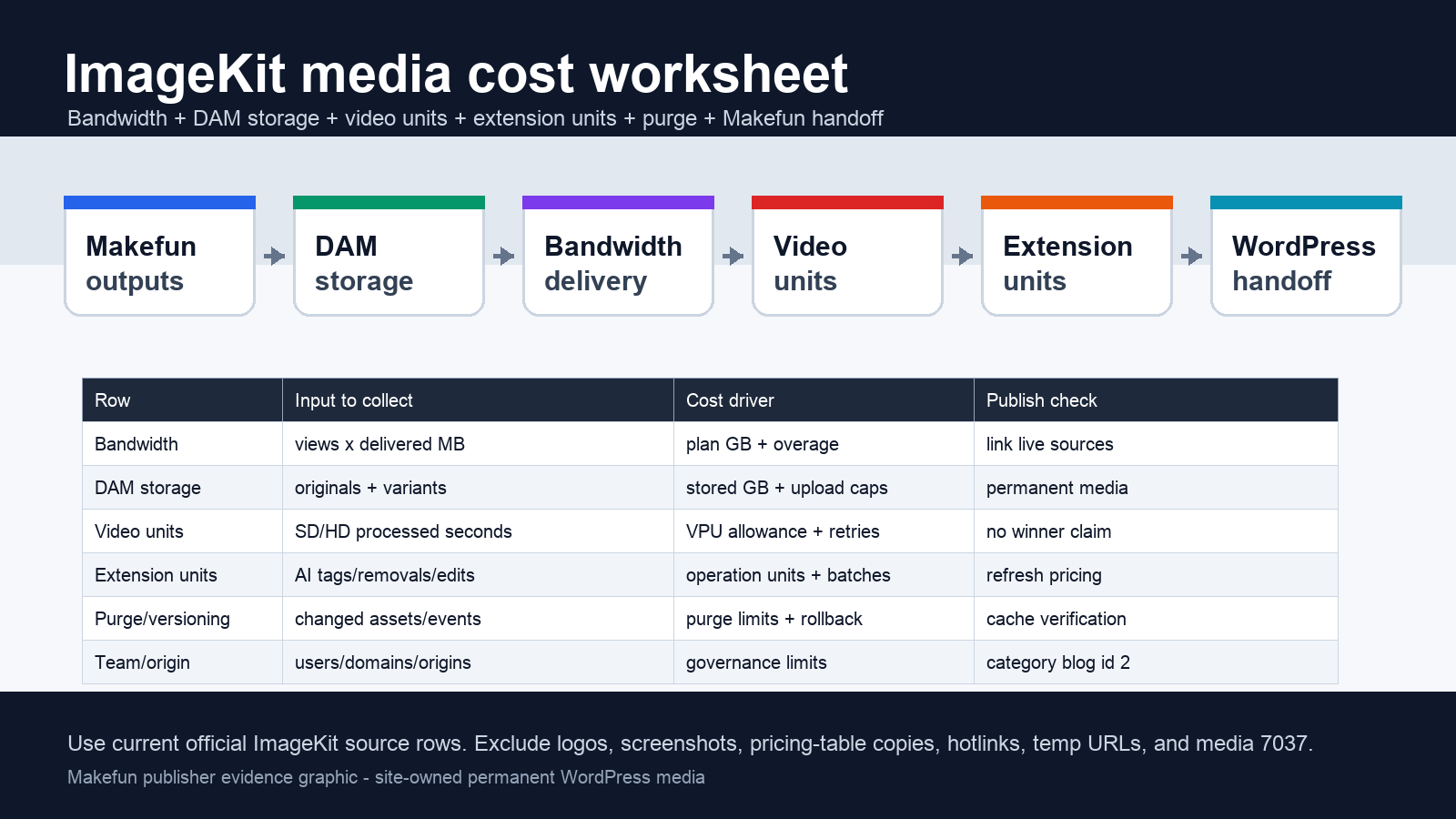
ImageKit cost planning works best as a unit worksheet, not as a single plan-price comparison. For Makefun-style generated media, separate bandwidth, DAM storage, video processing units, extension units, purge requests, users, custom domains, external origins, upload limits, QA time, and the final WordPress media handoff before comparing ImageKit with adjacent media workflows.
The publication-time source refresh for this article checked the official ImageKit pricing plans, ImageKit product page, transformation docs, video streaming page, and AI DAM page. Use those current official rows for the final numbers; do not copy a stale pricing table into a production estimate.

ImageKit pricing is a unit stack, not just a monthly plan
Start by listing the actual media operations the team will run after image or video generation. A Makefun workload may include optimized image delivery, retained originals, derived thumbnails, short video previews, AI tagging, background removal, cache purges, custom domains, external origins, and final WordPress registration. Each row can move independently: a team may stay inside a base subscription for bandwidth while exceeding DAM storage, or use little storage while consuming video or AI operation units.
The official pricing page currently exposes Free, Lite, Pro, and Enterprise paths with different allowances and overage patterns. Treat Enterprise as custom unless ImageKit gives a current quote. For self-serve rows, refresh the exact bandwidth, DAM storage, video-unit, extension-unit, purge, user, domain, origin, endpoint, public-link, and upload-limit fields at the time you build the estimate.
Current official source snapshot
For publication on 2026-06-06 UTC, the official sources were reachable and supported the same workload model. The pricing page contained plan allowances and overage rows for bandwidth, DAM storage, video units, extension units, purge requests, users, and production controls. ImageKit describes video units as tied to new video processing, while extension units cover AI-powered media operations such as background removal and tagging. Those two rows should stay separate from ordinary URL transformations.
The product, transformation, video, and DAM AI pages support the operational framing: optimize and transform media, manage assets, process video, use AI organization tasks, connect origins, and deliver final assets. They do not remove the need for manual QA, permanent media registration, alt text, social preview checks, cache checks, or rollback planning.
Calculator rows for generated media delivery
- Bandwidth: monthly views x average delivered MB, adjusted for format savings, cache behavior, and plan overage.
- DAM storage: originals, variants, thumbnails, retained backups, upload caps, and governance needs.
- WordPress handoff: approved outputs, permanent media upload, featured image registration, alt text, source links, cache checks, and social previews.
This is where ImageKit differs from a pure generation bill. The image model may be done after it creates a thumbnail, product visual, or social preview, but the media still needs storage, delivery, versioning, review, and publication handling.
Calculator rows for video and AI operations
- Video units: processed seconds, SD/HD mix, retries, adaptive streaming needs, subtitles, chapters, posters, and player workflow.
- Extension units: background removals, AI tagging, metadata enrichment, visual search, generative edits, upscales, retouches, batch size, and retry rate.
- QA controls: manual review minutes, rejected outputs, regenerated variants, and source-date refresh before publication.
Do not merge these rows into a generic AI media bucket. Video processing and AI extension operations can be consumed by different jobs, hit different limits, and create different editorial risks.
Team, domain, origin, purge, and governance rows
Production teams should add rows for user seats, custom domains, URL endpoints, external origins, public links, upload-size limits, folder policy, and audit requirements. Cache purge requests deserve their own line because regenerated media, campaign refreshes, and unversioned URLs can create operational work even when the asset itself is small.
When a Makefun article changes featured media, the estimate should include the cost of validating the canonical URL, a cache-busted URL, sitemap inclusion, Yoast metadata, body links, and temporary-media markers. Those checks are not ImageKit fees, but they are part of the real publication workflow.
Same-use alternatives and risk controls
Compare ImageKit only after normalizing the same workload. A Cloudinary AI transformation credit calculator can help frame transformation-credit thinking, while the Cloudflare R2 Images Stream media cost calculator gives a storage, image, and streaming baseline. Do not use unpublished or 404 Makefun pages as internal links, and do not call one path cheaper, faster, or more reliable without same-date same-workload evidence.
The safe conclusion is a worksheet, not a winner claim: choose ImageKit when its bandwidth, DAM, video, AI-operation, origin, and governance rows match the workload you actually run; choose another route when those rows shift the cost or operational burden elsewhere.
FAQ
What are ImageKit video units?
ImageKit ties video units to new video processing. Model processed seconds, SD/HD mix, retries, and streaming features before estimating the row.
What are ImageKit extension units?
Extension units cover AI-powered media operations such as background removal, tagging, metadata tasks, visual search, or related edits. Keep them separate from ordinary transformation and bandwidth rows.
Is ImageKit cheaper than Cloudinary or Imgix?
Do not answer by plan price alone. Compare the same workload across bandwidth, storage, AI operations, video processing, purge requests, team limits, origin/domain needs, and manual Makefun handoff.
Why include Makefun handoff in the calculator?
Generated media still needs review, permanent storage, WordPress registration, featured image variants, alt text, internal links, cache checks, source refresh, and rollback handling. Those rows prevent provider pricing from hiding production cost.


