
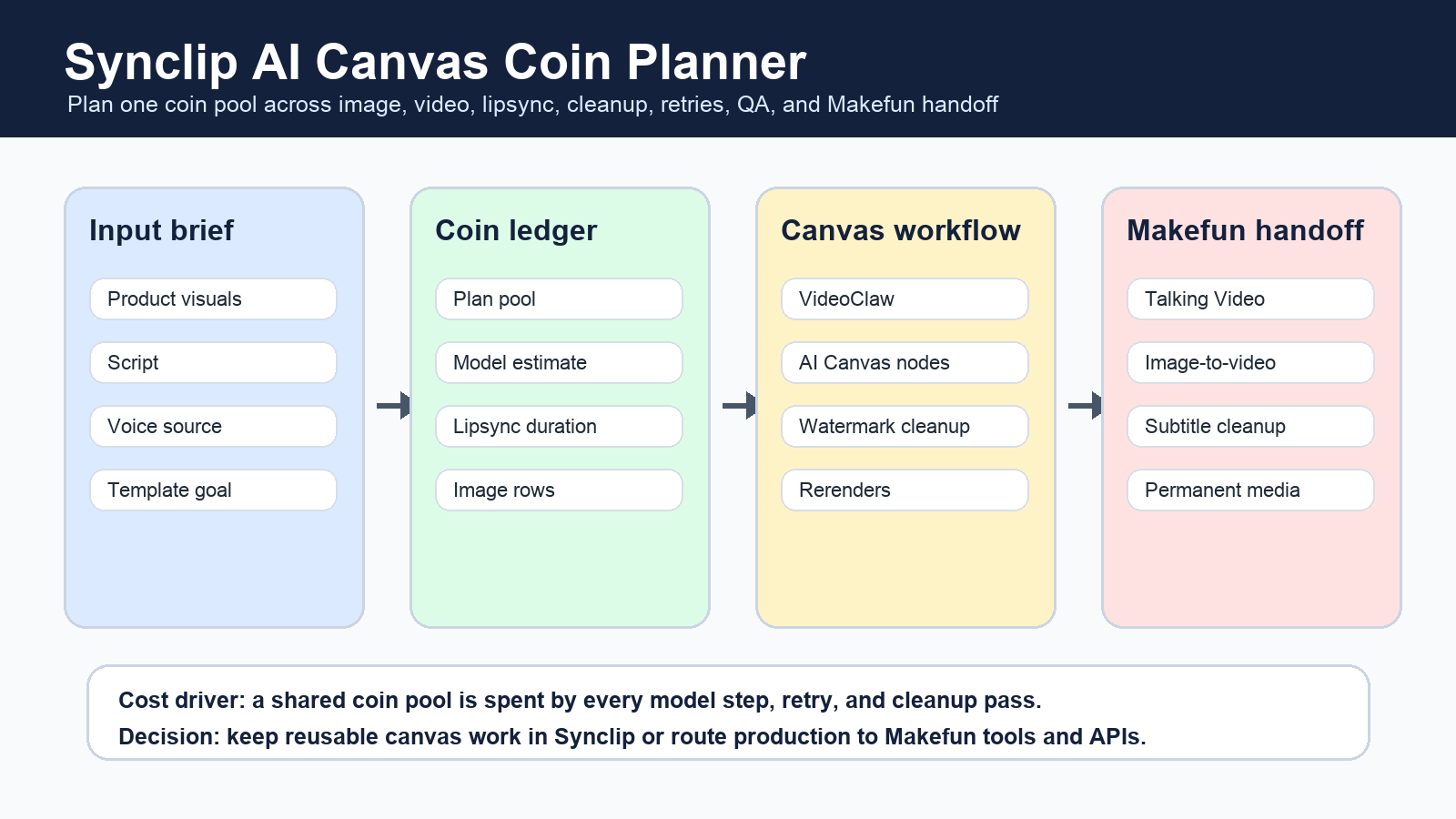
Synclip pricing is a shared coin-pool workflow problem, not just a plan-name comparison. For Makefun-style production, estimate every image, video, lipsync, watermark cleanup, AI Canvas node, rerender, QA pass, and final media handoff before deciding whether Synclip, Makefun, direct model APIs, or avatar/video specialists should own the workflow.
Publication checks refreshed official Synclip pages for pricing, the product homepage, AI Workflow Builder, developer/API information, and terms. Use those official pages for current coin pools, model availability, limits, and terms before quoting a price to a client.

Quick answer: start with the workflow chain
A Synclip plan can look sufficient until the same campaign spends coins across image generation, video generation, lipsync, cleanup, and retries. Start with the deliverable count, then map the steps that create each deliverable. A product demo, talking avatar, lesson clip, and UGC-style ad may use different combinations of AI Canvas templates, Video Creator, Lipsync Starter, Image Studio, Watermark Remover, and exports.
Synclip coin workflow planner
| Planner row | What to estimate | Why it matters |
|---|---|---|
| Monthly deliverables | Videos, product variants, lesson clips, avatar explainers, and social cuts per month. | The same coin pool has to cover every finished asset and every failed attempt. |
| Plan and coin pool | Current plan price, included coins, task limits, and upgrade threshold from Synclip pricing. | The headline plan price is only useful after the workload is normalized. |
| Video model mix | Video Creator model choice, duration, aspect ratio, prompt complexity, and pre-render estimate. | Heavy video models can consume the pool faster than simple image or cleanup rows. |
| Lipsync and voice | Text length, uploaded audio duration, voice tier, motion mode, and retake rate. | Talking-avatar workflows can be constrained by duration, character, and review limits. |
| Image and cleanup rows | Image Studio model/resolution, Watermark Remover clips, and cleanup retries. | A workflow may spend coins before and after the main video render. |
| AI Canvas reuse | Reusable template count, node count, branch variants, VideoClaw steps, and exports. | Templates save setup time only if reuse offsets coin waste and QA overhead. |
| Makefun handoff | Permanent media upload, captions, cleanup QA, WordPress or R2 registration, and product CTA path. | Temporary outputs are not a publishing finish line for Makefun pages. |
Makefun production scenarios
| Scenario | Synclip rows to price | Makefun route |
|---|---|---|
| Creator batch | Prompt image, short video, lipsync, cleanup, retries, final export. | Talking Video plus subtitle cleanup. |
| Agency product variants | AI Canvas template, product image, video model, voice/lipsync, approval rounds. | Image to Video and AI Video Ad Generator. |
| Avatar explainer | Script length, portrait input, voice route, lipsync duration, rerender rate. | AI Avatar Video Generator and Talking Video Lip Sync. |
| UGC-style ad | Persona asset, product proof, video render, cleanup, disclosure review. | AI UGC Video Generator and Makefun pricing review. |
| Cleanup after generation | Watermark cleanup, subtitle cleanup, export, QA, and permanent media registration. | Watermark Remover and permanent WordPress media handoff. |
Same-use comparison frame
Compare Synclip against Makefun, HeyGen, Tavus, D-ID, Runway, Kling, Veo, Canva, Descript, Veed, ElevenLabs Dubbing, and direct image or video model APIs by workflow step. Do not compare only monthly subscription names. Normalize the task into input assets, model step, duration, render count, cleanup, QA, and final handoff.
| Route | Best fit | Watch the hidden cost |
|---|---|---|
| Synclip AI Canvas | Reusable multi-step creative chains where one coin pool covers image, video, audio, lipsync, and cleanup. | Model estimates, rerenders, task caps, and workflow-node sprawl. |
| Makefun managed workflow | Product videos, talking avatars, image-to-video clips, cleanup, and publishing handoff. | Review time, final media registration, and product CTA match. |
| Avatar API tools | Repeatable presenter or support-avatar jobs. | Consent, voice rights, disclosure, batch QA, and API volume. |
| Direct video APIs | Heavy model-specific production where the team wants direct control. | Engineering time, storage, retries, moderation, and post-production cleanup. |
| Editors and design suites | Human-edited social variants and brand templates. | Seat pricing, export limits, review cycles, and manual work. |
Risk checklist before publishing a Synclip cost estimate
Refresh Synclip pricing and terms on the publication date. Avoid cheapest, best, quality, latency, or reliability claims unless the comparison uses the same source assets, same date, and same workload. Treat per-task model costs as estimates when Synclip shows them before render. Keep commercial-use and rights assumptions separate from the coin math.
For Makefun users, route the final recommendation to the relevant workflow: Talking Video, Image to Video app, AI Video Ad Generator, AI Avatar Video Generator, Subtitle Remover, Watermark Remover, and Makefun pricing.
FAQ
What is the best way to estimate Synclip pricing?
Start with the current official pricing page, then model the full workflow: video model choices, image generation, lipsync, cleanup, AI Canvas nodes, retries, exports, QA, and final handoff.
Should I compare Synclip by plan price only?
No. A plan comparison misses how a shared coin pool is consumed by every model step and rerender. Compare by finished workload and same-use rows instead.
When should a Makefun user route work outside Synclip?
Route work to Makefun when the main job is talking-video generation, image-to-video, product ad creation, subtitle cleanup, watermark cleanup, or permanent media publishing handoff rather than reusable Synclip canvas production.
Can I quote exact Synclip task costs in a client estimate?
Only after checking the current Synclip interface and official pricing. Some model or task estimates can be shown before render and may change by model, duration, resolution, or workflow settings.


