
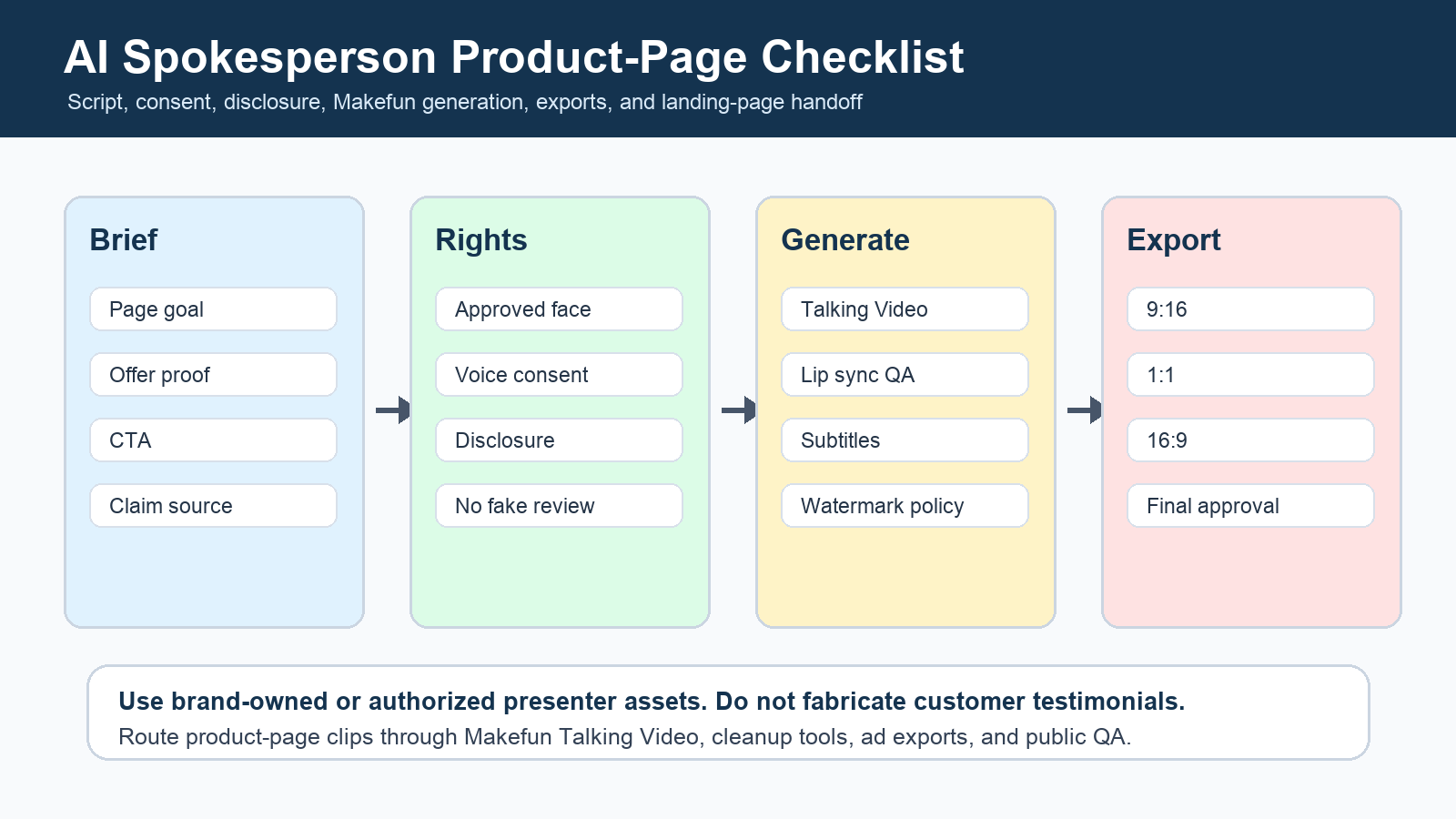
An AI spokesperson video generator helps a product team turn one landing-page message into a short presenter-style clip: choose an approved face or avatar, write a claim-safe script, generate a talking video, add a clear CTA, export 9:16, 1:1, and 16:9 versions, then place the clip on the product page or ad funnel. Use Makefun Talking Video when the source is a face or avatar, Talking Photo for portrait-led explainers, Voice Clone only with permission, and subtitle or watermark cleanup before publishing.
Publisher refreshed Google Ads video-asset guidance and FTC endorsement and fake-testimonial guidance on June 25, 2026 before creating this article. Use those official pages as source paths because ad specifications, disclosure expectations, and testimonial rules can drift.

Start with the product-page job, not the avatar tool
Define the page goal first: explain a feature, introduce a founder message, answer objections, announce a sale, or create a paid-social cutdown that sends viewers back to the same landing page. This keeps the page distinct from AI Avatar Video Generator, which is broader avatar coverage.
For Makefun routing, start with Talking Video, use Talking Video Lip Sync when audio and video need repair, send developer handoffs to the AI Avatar API, and use AI Video Ad Generator when the same spokesperson clip becomes a campaign variant.
Use a claim-safe spokesperson script
Write a 20-45 second script with a hook, product proof, audience problem, one concrete benefit, CTA, and a disclosure line when the presenter is paid, synthetic, affiliated, or not an independent customer. Do not invent a customer testimonial, celebrity endorsement, employee consent, performance result, or pricing claim.
| Script row | Use it for | Publisher check |
|---|---|---|
| Hook | State the landing-page problem in one sentence. | No unsupported best, cheapest, or guaranteed claim. |
| Product proof | Show the feature, offer, or result the page can support. | Keep a source note for performance or availability claims. |
| Presenter rights | Confirm the face, avatar, and voice are brand-owned or consented. | No public-figure, celebrity, or unauthorized employee likeness. |
| Disclosure | Clarify paid, affiliated, synthetic, or brand-presenter context when needed. | Avoid fake customer or independent-review framing. |
| CTA | Point viewers to the same product page, pricing page, or app route. | Match the final URL and page promise. |
Build the Makefun generation workflow
Prepare an approved portrait, avatar source, or brand-owned presenter asset; collect face and voice permission before generation. Generate the talking video, review lip sync and pronunciation, then use Voice Clone only when the speaker has granted rights for that voice use.
Before publication, clean subtitles, burned-in text, watermarks, crop safety, and CTA overlays so the same clip can work on a product page and in paid-social placements. If the workflow is actually a UGC-style ad, route readers to AI UGC Video Generator for disclosure-safe campaign framing.
Export for product pages and ad cutdowns
Create a landing-page hero or mid-page proof clip, then cut vertical 9:16, square 1:1, and horizontal 16:9 variants from the same approved script when the asset will support paid-social or Performance Max campaigns. Keep short ad cutdowns inside the platform guidance range where the guidance applies.
| Placement | Best spokesperson format | Makefun handoff |
|---|---|---|
| Product-page hero | Short founder or brand presenter clip with one promise and one CTA. | Talking Video plus final page QA. |
| Feature proof block | Product-demo presenter with screen-safe claim language. | Talking Photo or Talking Video, then subtitles. |
| Objection answer | Support-style explainer that answers one purchase hesitation. | Lip sync QA and caption cleanup. |
| Paid-social cutdown | 9:16, 1:1, and 16:9 versions from the same approved script. | AI Video Ad Generator and final URL check. |
| Developer workflow | Programmatic avatar or spokesperson asset creation. | AI Avatar API plus content approval owner. |
Spokesperson video checklist asset
| Checklist item | What to document before publishing |
|---|---|
| Page goal | Feature explainer, founder message, objection answer, sale announcement, product demo, or ad cutdown. |
| Approved presenter asset | Brand-owned avatar, consented portrait, staff or founder likeness, or non-real illustrative avatar. |
| Script guardrails | Hook, one product proof, one benefit, CTA, claim source, disclosure line, no fake testimonial. |
| Makefun route | Talking Video, Talking Photo, Voice Clone with permission, AI Avatar API, AI Video Ad Generator, cleanup tools. |
| Export spec | 9:16 vertical, 1:1 square, 16:9 horizontal, landing-page embed version, CTA safe zone. |
| Approval | Consent evidence, rights owner, compliance reviewer, landing-page owner, and Publisher source refresh date. |
FAQ
Is an AI spokesperson video the same as an AI avatar video?
No. An avatar video can be any talking character clip. This workflow is narrower: an approved presenter asset, claim-safe product-page script, CTA, disclosure, export sizes, and placement.
Can I make a fake customer testimonial with an AI spokesperson?
No. Use a brand presenter, founder, employee with consent, or clearly synthetic explainer instead. Do not fabricate customers, reviews, endorsements, or relationship claims.
Which Makefun tool should I use first?
Start with Makefun Talking Video for face or avatar scripts, Talking Photo for portrait-led clips, Voice Clone only with permission, AI Avatar API for developer handoff, and cleanup tools for subtitles, overlays, and watermarks.
What video formats should I export?
Create vertical 9:16, square 1:1, and horizontal 16:9 variants when the clip will support paid-social or Performance Max campaigns; keep short ad cutdowns in the 10-60 second range where platform guidance applies.
How does this connect to Makefun pricing?
Use the Makefun Pricing page when a workflow needs plan, watermark, credit, or export expectation checks, and use Best AI Video Generator 2026 when the reader is still choosing a model or platform.


