
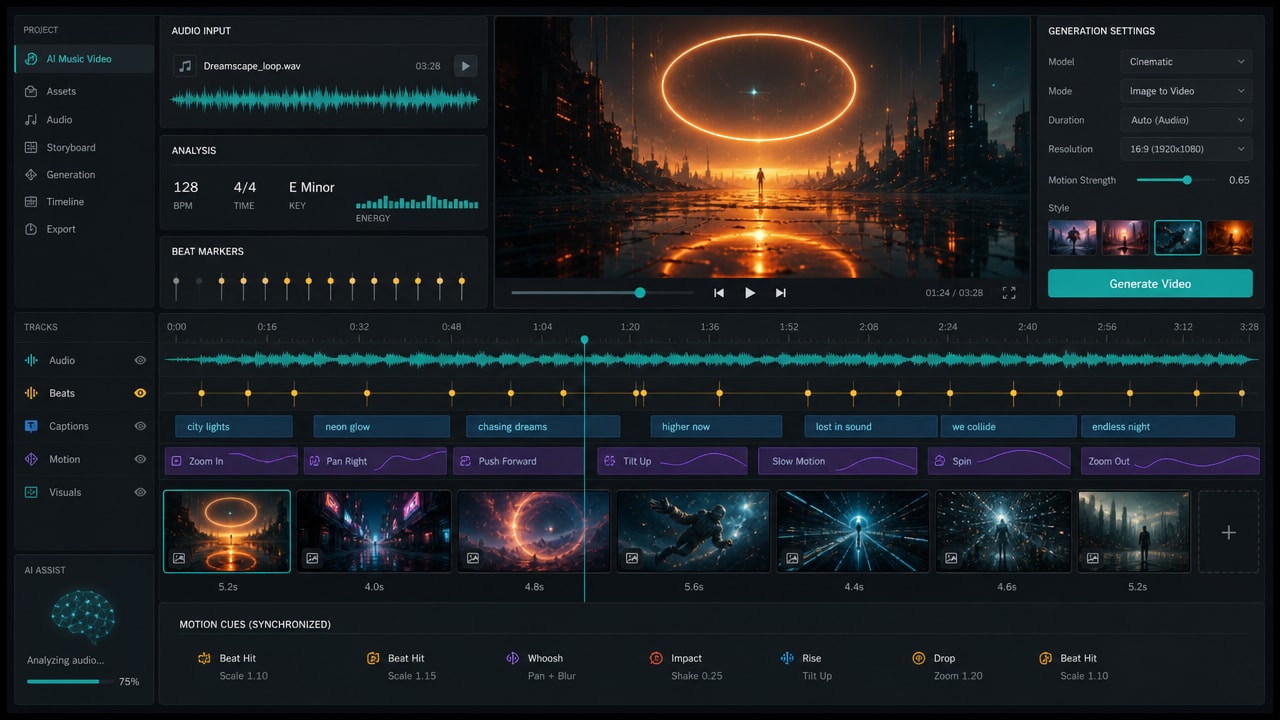
AI music video generator from audio is becoming a practical search and creator workflow because musicians, short-form editors, and marketers want visuals that respond to a finished track instead of a generic prompt. The useful workflow is not just text-to-video; it combines audio analysis, beat timing, lyrics or captions, storyboard prompts, and model selection.
Why audio-first video workflows are rising
Recent tool pages and creator discussions show the same pattern: users want to upload a song, voiceover, podcast clip, or audio file and receive a video plan with scenes, pacing, captions, and visual changes that follow the rhythm. Dedicated products such as HeyGen, Pollo AI, MusVideo, and newer music-video tools are positioning around audio-reactive or beat-synced generation, while model platforms keep improving native audio and image-to-video quality.
What an AI music video generator should handle
A strong workflow starts by reading the song structure: intro, verse, chorus, drops, silence, and vocal sections. From there, the creator still needs control over mood, aspect ratio, character consistency, captions, and whether each clip should be generated from text, a reference image, or an existing video frame.
- Audio analysis: detect beats, lyrics, mood, section changes, and energy shifts.
- Storyboard planning: map the track into short scenes before generating clips.
- Image-to-video control: use still frames or cover art when visual consistency matters.
- Caption and lip-sync support: decide whether the video needs lyrics, subtitles, or a talking performer.
- Model routing: test different AI video models instead of assuming one model fits every song.
Where Makefun fits in the workflow
Makefun already covers adjacent creator needs: image-to-video generation, talking video and lip-sync, and broader AI video generator trends. For a music-video workflow, a practical sequence is to create or upload visual references, animate the strongest frames, then use captions or lip-sync only where the song actually needs on-screen words.
How to choose models for audio-driven videos
Native-audio video models are useful when a scene needs sound effects or generated dialogue, but music-video creation often starts with an existing song. In that case, the priority is timing control, shot consistency, vertical or widescreen output, and how easily the clips can be edited against the track. Model-specific pages such as Kling 3.0 Omni and Wan 2.7 are useful when the brief needs stronger motion control, cinematic shots, or image-to-video iteration.
Practical checklist before generating
- Pick the delivery format first: TikTok/Reels vertical, YouTube Shorts, Spotify Canvas, or widescreen music video.
- Break the track into sections and decide which sections need new visuals.
- Use reference images for recurring characters, products, or cover-art style.
- Generate short clips in batches, then edit to the beat rather than accepting one long generation.
- Keep lyrics, subtitles, and lip-sync only where they improve comprehension.
FAQ
Can AI generate a music video from only an audio file?
Some tools can create a rough music video from an uploaded audio file, but professional results still benefit from a storyboard, reference images, and manual review of timing.
Is audio-reactive generation the same as native audio video generation?
No. Audio-reactive generation starts from an existing track and adapts visuals to it. Native audio video generation creates or synchronizes sound as part of the video model output.
Should creators use text-to-video or image-to-video for music videos?
Use image-to-video when style consistency matters. Use text-to-video for exploratory scenes, abstract visuals, or quick background shots.
What is the best workflow for short music clips?
Start with a short section of the song, generate multiple 4-8 second clips, then edit the strongest clips to the beat with captions or lyric overlays only where needed.


