
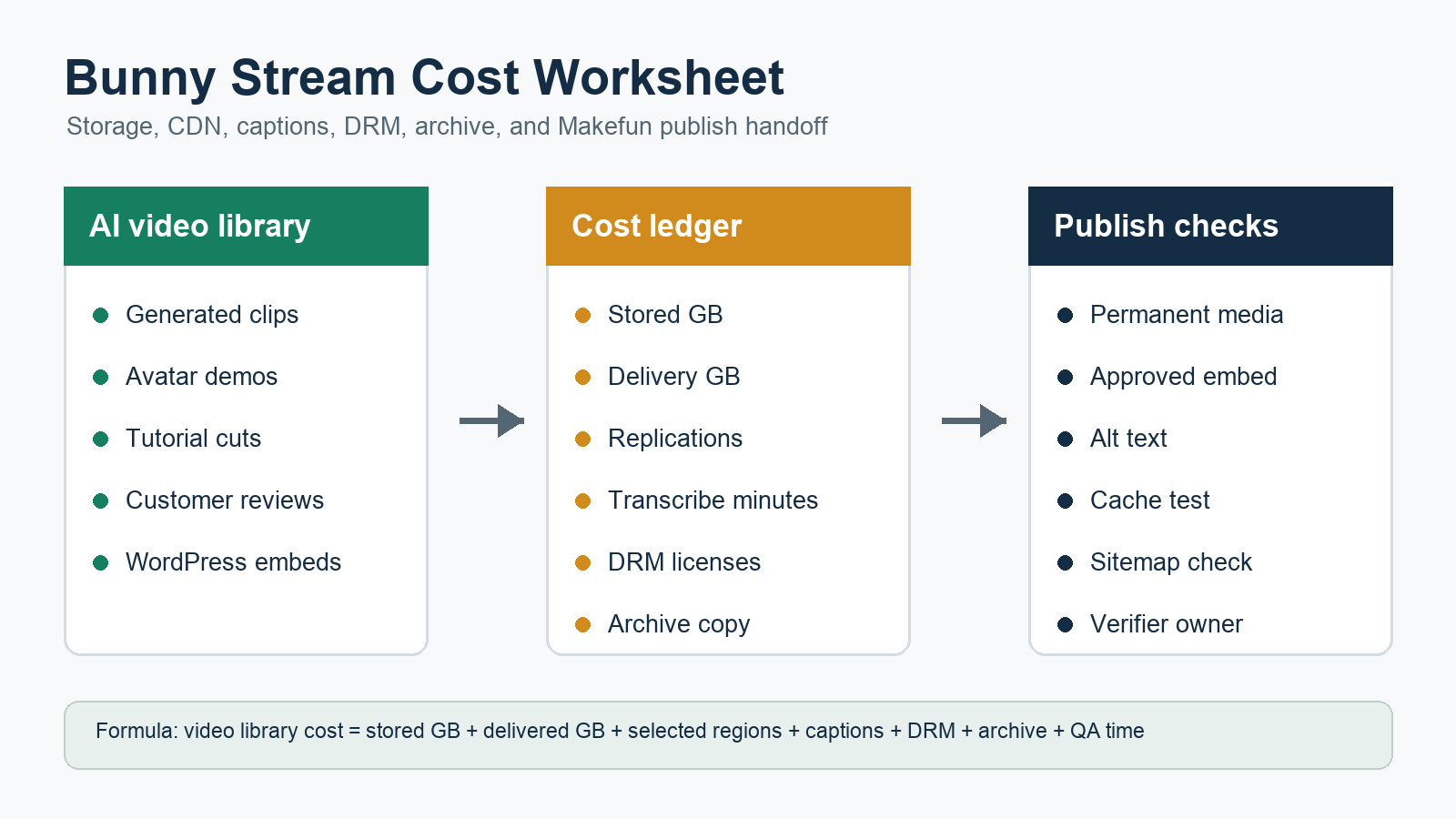
Quick answer: Bunny Stream costs are not just an upload fee. Model stored video GB, monthly CDN delivery GB, selected replication points, and delivery tier first. Then add enabled resolutions, MP4 fallback, original-file retention, premium encoding, Transcribing languages, DRM licenses, embed/player QA, archive copies, and WordPress publication handoff.
This calculator frames Bunny Stream as a same-workload media-library decision for Makefun AI video workflows, not as a generic video-hosting ranking. Refresh the official Bunny pricing pages before using the numbers in a production budget.
Bunny Stream pricing starts with stored GB and delivered GB
The core worksheet begins with two usage meters: how much video is stored and how much traffic is delivered. Bunny’s current Stream pricing page and docs describe storage, CDN delivery, replication, encoding, Transcribing, DRM, and related caveats, so the safest planning unit is a monthly video library rather than a single upload.
- Stored GB: source files plus encoded outputs, optional MP4 fallback, original-file retention, and selected resolutions.
- Delivered GB: expected playback traffic, embeds, review traffic, and customer demo usage.
- Operations rows: captions/transcripts, DRM, archive copy, player QA, cache checks, and publication review.
Use Bunny’s official Stream pricing and Stream pricing documentation as the source of truth. Avoid copying old pricing rows into a permanent workflow doc without a fresh check.
Official source snapshot and caveats
A publication-time refresh should cover Bunny’s pricing page, Stream pricing docs, Stream API reference, video specification, and encoding docs. Those pages define the current billing language and the controls that can expand storage or processing needs.
- Stream API reference for upload, library, embed, collection, webhook, and automation workflows.
- Video specification for output behavior and storage-expansion risk.
- Encoding documentation for enabled resolutions, fallback options, and processing controls.
Keep standard transcoding, premium encoding, Transcribing, DRM, storage expansion, and handoff labor as separate worksheet rows. That prevents one low storage line from hiding the real cost of a Makefun video library.
Same-workload worksheet for a Makefun AI video library
| Worksheet row | What to collect | Why it matters |
|---|---|---|
| Source videos | Clip count, average source MB, duration, source format | Sets the starting storage and processing load. |
| Encoded outputs | Enabled resolutions, codecs, MP4 fallback, keep-original setting | Can make stored output larger than the original upload set. |
| Delivery | Monthly views, expected GB, region needs, embed locations | Drives CDN delivery and performance tradeoffs. |
| Captions | Minutes, languages, review owner, transcript reuse | Keeps Transcribing separate from storage and CDN rows. |
| DRM | Protected demos, license tiers, base fee, gated assets | Only needed for protected review or customer-demo workflows. |
| Archive | R2 copy, source-file retention, rollback path | Prevents temporary or unregistered media from becoming the source of truth. |
| Publication QA | WordPress embed, alt/caption, cache status, sitemap check | Connects cost planning to a public Makefun page that can be verified. |
For Makefun, connect this downstream media plan to upstream creation routes such as the Makefun AI video generator. A video hosting bill only matters after the generated clips, demos, tutorials, or support videos are approved for publication.
Replication, encoding, MP4 fallback, and original-file controls
Replication and encoding settings are planning decisions, not afterthoughts. The worksheet should record selected storage regions, enabled output resolutions, MP4 fallback, premium codecs, and whether original files are retained. Each option affects storage, playback behavior, QA, or rollback.
For a WordPress-facing workflow, also decide where the permanent asset is registered. Bunny Stream can serve video embeds, while other Makefun media assets may stay in WordPress media, Cloudflare R2, or a post-production pipeline. Treat the permanent location and verifier ownership as part of the cost model.
Transcribing and DRM rows
Transcribing should be modeled as language minutes: video minutes multiplied by selected languages, then reviewed against current Bunny terms. DRM should be a separate protected-demo row with base and license assumptions refreshed from official docs before a client budget is shared.
Do not turn DRM into a broad security promise. In this calculator, it is a cost-control option for protected customer demos, gated training libraries, or review assets where the team intentionally needs license controls.
Same-use comparison matrix
Normalize each option by an approved monthly video library, not by a single vendor headline row.
| Route | Dominant meter | Good fit |
|---|---|---|
| Bunny Stream | Stored GB, delivered GB, replication, captions, DRM | Hosted video libraries with embeds and optional protected demos. |
| Cloudflare R2 / Stream media workflow | Storage, delivery, image/video pipeline choices | Teams already using R2 or Cloudflare media infrastructure. |
| ImageKit video extension and DAM | Media units, DAM, transformations, delivery | Image-heavy libraries that also need video and DAM controls. |
| Cloudinary AI transformation credits | Transformation credits, delivery, derived assets | Post-generation transformation and asset-management workflows. |
| R2 plus FFmpeg/HLS workers | Storage, compute, worker time, QA labor | Teams that want more control and accept more operations work. |
| Direct WordPress media | Editorial simplicity, file size, cache behavior | Small libraries where embeds and advanced controls are unnecessary. |
The matrix is a planning tool, not a winner declaration. Bunny can be the right route for hosted playback, while Makefun may still use WordPress media, R2, or a managed handoff for other publication assets.
Makefun handoff and Publisher checks
Before publishing a Bunny Stream calculator, the Publisher owner should complete these gates:
- Refresh Bunny pricing and docs.
- Confirm the target slug does not duplicate an existing Makefun page.
- Use unique permanent site-owned media, not provider logos, copied UI, hotlinked frames, temporary URLs, or media ID 7037.
- Publish under blog category id 2 with Yoast title, meta description, canonical, and social image fields.
- Verify REST status, canonical URL, cache-busted URL, sitemap inclusion, featured media, and body links.
FAQ
What should a Bunny Stream cost calculator include?
Include stored video GB, monthly delivery GB, replication points, delivery tier, enabled resolutions, MP4 fallback, original-file retention, premium encoding, Transcribing languages, DRM licenses, player/embed QA, archive copies, and WordPress publication handoff.
Is Bunny Stream cheaper than Mux or Cloudflare Stream?
Do not answer from raw pricing rows. Normalize the same video library by stored GB or minutes, delivery GB or minutes, captions, DRM, storage expansion, embeds, archive copies, and operations labor before comparing routes.
How does Transcribing pricing affect Makefun videos?
Treat Transcribing as a separate language-minute row. Multiply video minutes by selected languages, then refresh the current official rate before publication.
When should the worksheet include DRM?
Include DRM only for protected customer demos, training libraries, or gated review assets. Keep DRM costs separate from storage and CDN rows.
Does MP4 fallback or keeping originals change storage?
Yes. Fallback files, retained originals, premium codecs, and enabled resolutions can change stored output, so the calculator should model them explicitly.


