
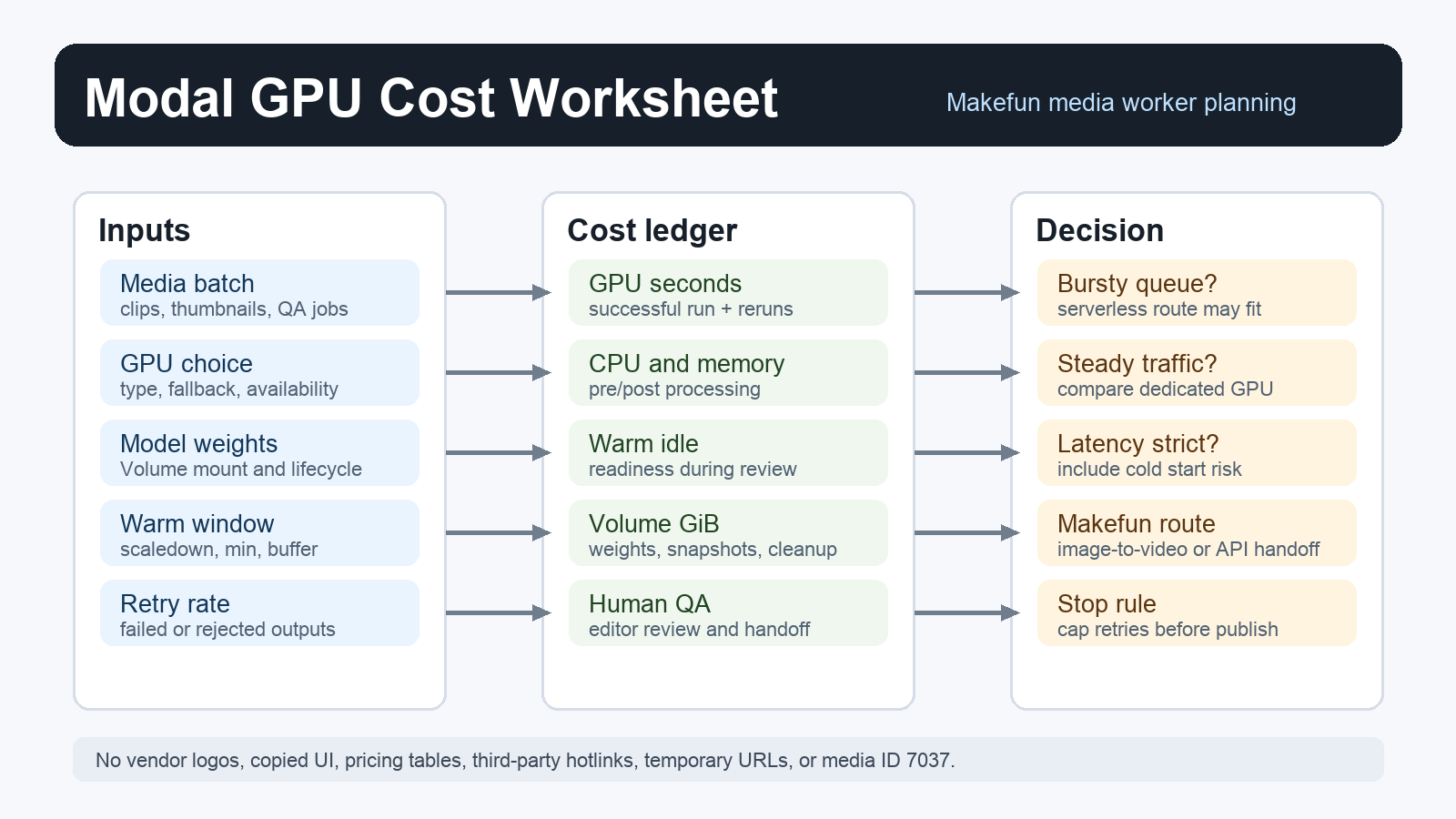
Short answer: use this Modal GPU pricing worksheet when a Makefun media workflow has bursty GPU work, model weights that should stay near the worker, or cold starts that affect editor turnaround. Estimate the job cost as GPU seconds plus CPU, memory, warm-container time, Volume storage, model-weight movement, retries, logs, and review labor. Then compare that total with a dedicated deployment or another serverless GPU route.
Modal cost formula for media workers
Modal is useful when your workflow needs GPU bursts rather than a permanently rented machine. For Makefun-style work, that usually means image/video QA, model demos, caption cleanup helpers, embedding refreshes, transcode jobs, and experiment workers that may sit idle between batches. The calculator should keep each cost lane separate instead of treating “GPU seconds” as the whole bill.
| Lane | What to estimate | Why it matters |
|---|---|---|
| GPU runtime | Successful GPU seconds by GPU type, including fallback choices. | Modal pricing is usage-based, so retries and longer clips compound quickly. |
| CPU and memory | Non-GPU processing, preprocessing, postprocessing, and RAM-heavy helper steps. | Media pipelines often spend time outside the GPU kernel. |
| Cold start and warm time | Initialization, scaledown_window, min_containers, and buffer_containers. | Warm workers reduce wait time, but idle readiness still has a cost. |
| Volumes and weights | Volume storage, snapshots, model weight lifecycle, mounts, and file churn. | Large model files can dominate both startup behavior and storage hygiene. |
| Retries and review | Failed generations, moderation reruns, editor QA, and publishing handoff. | The real article or campaign cost includes human cleanup, not only infrastructure. |
Worksheet scenario
Start with one production-shaped batch instead of an abstract monthly guess. For example, a product-video batch might run 120 short QA jobs, keep a worker warm during an editor review window, mount a Volume with model weights, retry 8 percent of jobs, and export final assets to WordPress or R2. The worksheet should calculate the base run, retry run, idle warm period, storage period, and review handoff as separate rows.
- Base job row: jobs x average GPU seconds x selected GPU price, plus CPU and memory time.
- Retry row: failed or rejected outputs x full rerun cost, not only the final successful file.
- Warm row: containers kept ready for editor turnaround, preview checks, or burst arrivals.
- Storage row: Volume GiB, model weights, temporary outputs, logs, and cleanup timing.
- Handoff row: Makefun editor QA, subtitle or watermark cleanup, API packaging, and publishing checks.
When Modal beats a standing GPU
Modal can be a strong fit when the queue is uneven, when the team needs different GPU types for different experiments, or when model weights can be staged once and reused across bursts. A standing GPU or dedicated deployment can be better when utilization is steady, latency targets are strict, or the same model serves traffic all day. Do not compare only the first successful render. Include idle time, startup wait, retry rate, storage retention, and operator time.
For adjacent routes, compare this worksheet with the RunPod serverless GPU idle timeout calculator, the Cerebrium cold start calculator, the Replicate deployments autoscaling calculator, and the DeepInfra private deployment break-even calculator. Keep the Modal page specific to Modal, with those links used only as same-use alternatives.
Makefun routing checklist
Use this calculator before routing a new media workflow into production. If the work is a one-off creative batch, send the final assets through Makefun image-to-video or the relevant editor workflow. If the work becomes repeatable, package the cost assumptions for the Makefun AI video API path so engineering, editorial, and support can review the same assumptions.
- Confirm the target GPU type, fallback order, and expected availability.
- Record the model-weight source, Volume retention period, and cleanup owner.
- Separate preview, final render, retry, and human-review costs.
- Set a stop rule for failed batches before retries exceed the campaign value.
- Link the final workflow back to Makefun product pages, not only to infrastructure notes.
Current official sources
Refresh these before changing the calculator: Modal pricing, Modal GPU acceleration, Modal cold start behavior, Modal Volumes, and Modal model weight guidance. This article does not copy Modal pricing tables; it turns the cost drivers into a workflow worksheet.
FAQ
Should I include warm containers in the estimate?
Yes. Warm capacity can improve turnaround, but it is part of the operating cost. Estimate the review window and queue shape, then decide whether the speed benefit is worth the idle readiness cost.
Are Volumes optional for model weights?
They are a planning choice. For large or reused weights, a Volume can reduce repeated setup work, but it adds storage lifecycle and cleanup responsibilities that should appear in the worksheet.
What is the Makefun decision rule?
Use Modal when burst scaling and workflow flexibility beat the cost and latency of a standing deployment. Use a dedicated or managed route when utilization is steady, the workflow needs tighter latency, or editorial teams need a simpler handoff.


