
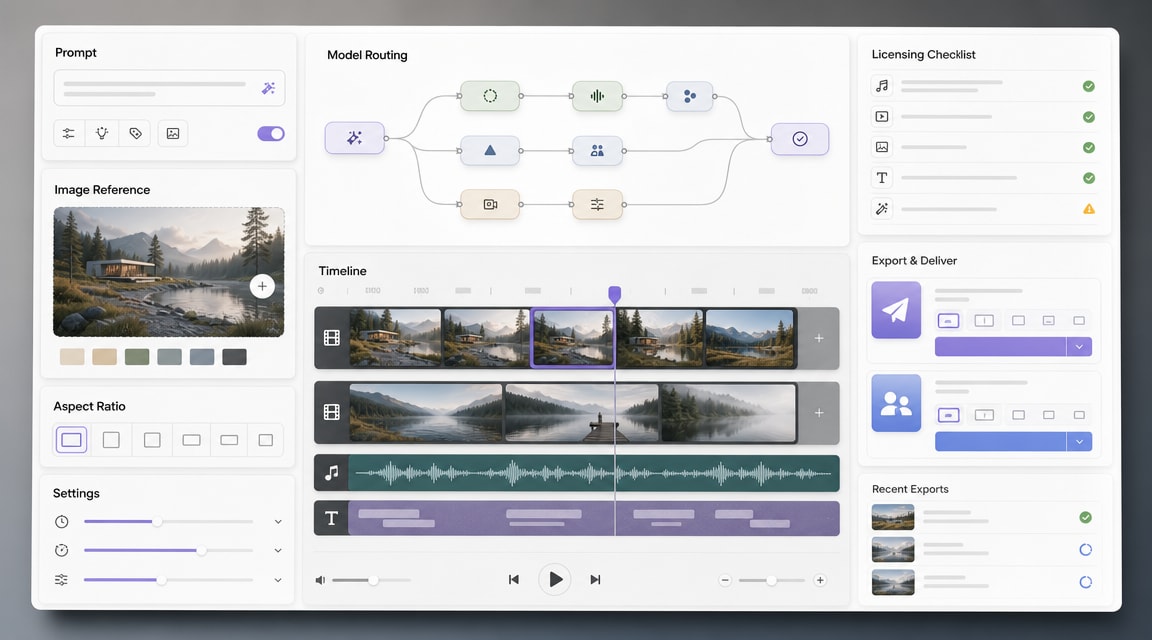
Shutterstock AI video generator is a useful signal for where AI video search demand is moving in 2026: teams are not only comparing raw model quality, they are also looking for commercial-ready workflows, licensing clarity, prompt-to-video speed, and image-to-video control.
What Shutterstock AI Video Generator Adds To Commercial-Ready AI Video
Shutterstock announced its AI Video Generator as part of a broader commercial-ready GenAI push, with emphasis on high-quality output and clear licensing for creative teams. That positioning matters because many AI video searches now combine production goals with risk questions: can the clip be used in a campaign, can it start from an image reference, and can a team keep work consistent across formats?
For Makefun readers, the practical takeaway is not that one vendor replaces every model. The stronger lesson is that AI video workflows are becoming multi-step creative systems: plan the scene, choose text-to-video or image-to-video, select an appropriate model, review rights and safety, then export for a specific channel.
Text-To-Video, Image-To-Video, And Short-Clip Workflows
Shutterstock’s launch fits the same demand pattern already visible across Makefun’s AI video coverage. A prompt can create a first concept, but many marketing teams get better control by starting from a still image, product frame, storyboard, or approved visual direction. That makes image-to-video an important companion workflow rather than a secondary feature.
Short clips also need format planning. A social ad, YouTube transition, product reveal, and campaign storyboard each need different aspect ratios, pacing, and review expectations. This is why AI video generator trends in 2026 increasingly point toward model routing and all-in-one creation instead of a single universal generator.
Why Licensing And Model Routing Matter
The PRNewswire launch announcement frames Shutterstock’s tool around commercial readiness and a unified solution for text- and image-to-video generation. That is a notable competitor observation: licensing, review controls, and team workflows are becoming SEO hooks, not only legal footnotes.
Model routing is another key theme. Creative teams want the option to use different engines for realism, motion, product shots, or cinematic scenes without rebuilding the whole workflow. This overlaps with the same search intent behind agentic video generator tools and multi-model creative assistants such as Adobe Firefly AI Assistant.
Where It Fits In An All-In-One Creative Workflow
A useful commercial AI video stack should help with more than generating a raw clip. Teams need an intake brief, approved reference assets, model choice, review notes, brand checks, licensing confidence, and export handoff. Shutterstock is using its licensing and stock-media roots to compete on that trust layer, while all-in-one AI workspaces compete on speed, model breadth, and workflow continuity.
For Makefun, this creates a strong long-tail content angle: users searching for Shutterstock AI Video Generator are also likely comparing commercial AI video generator options, image-to-video workflows, all-in-one creative studios, and model-selection tradeoffs.
FAQ
What is Shutterstock AI Video Generator?
It is Shutterstock’s AI video creation tool for generating short video concepts from text, image, or short-clip inputs, positioned for creative and marketing workflows with commercial-readiness in mind.
Can it use both text and image prompts?
Yes. Current product messaging and launch coverage emphasize text-to-video and image-to-video workflows, which helps teams start from either a written brief or an approved visual reference.
How is commercial-ready AI video different from casual generation?
Commercial-ready workflows put more weight on licensing clarity, team review, format control, repeatability, and whether the output can safely move into campaigns or client work.
Should teams use one model or a multi-model creative workflow?
For repeat production, a multi-model workflow is usually more flexible. Different models can be better for product shots, cinematic motion, reference-driven clips, or fast social variations.
Source: Shutterstock AI Video Generator launch announcement.


