
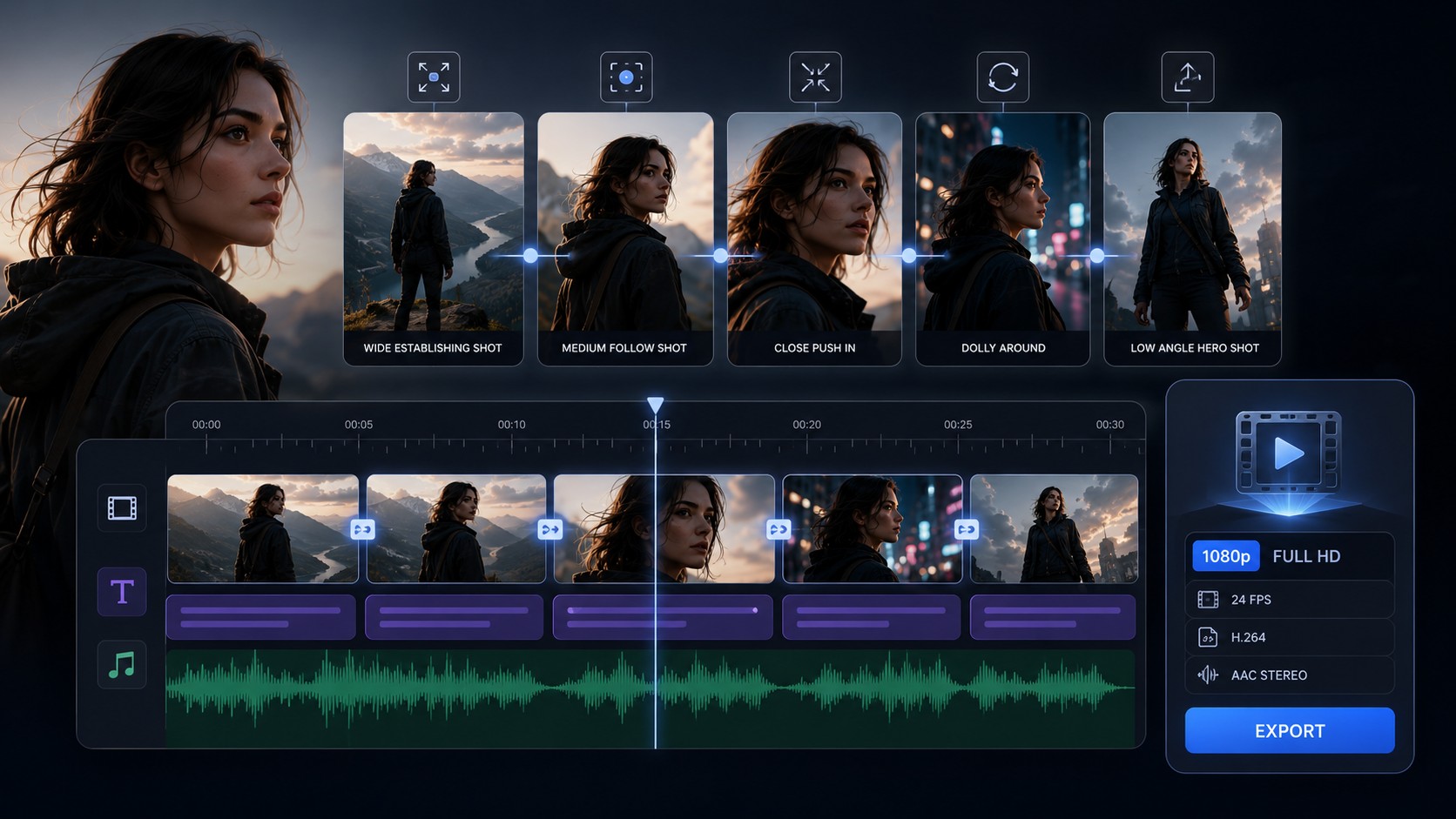
BACH AI video engine is a timely AI video topic because the market is moving from single impressive clips toward directed, multi-shot video sequences. Video Rebirth announced BACH on May 7, 2026, positioning it around 30-second multi-shot films, reference images, location context, character identity, camera language, emotional performance, and narrative structure in one workflow.
Why BACH matters for AI video generator searches
Most AI video generator pages still focus on a single shot: text-to-video, image-to-video, camera motion, or a short loop. BACH is interesting because the official launch frames the product as a video engine for connected shots rather than one isolated clip. That creates a useful long-tail search angle for creators who want an AI video generator for story sequences, product ads, short drama scenes, or consistent-character social content.
The public BACH page describes a workflow where users describe a sequence and receive a multi-shot film up to 30 seconds. The same positioning appears in market coverage from PixVerse, which explains the difference between isolated AI clips and a directed sequence with reference assets, location images, and shot-by-shot instructions.
What BACH appears to target
Based on the launch materials, the practical search intent is not simply “make a video from text.” The stronger intent is closer to these jobs:
- turn a product or character idea into a short multi-shot film;
- keep a person, outfit, object, or scene coherent across cuts;
- describe camera language and emotional beats without manually stitching separate clips;
- generate native 1080p short-form creative for ads, explainers, trailers, or story previews;
- compare BACH with broader AI video generator workflows from tools such as Wan 2.7, Runway Gen-4.5, Veo 3.1 Lite, and HappyHorse 1.0.
How it fits the current AI video market
The broader competitor pattern is clear: all-in-one creative platforms want users to choose a model, feed in text or images, and keep the whole workflow in one place. Pollo AI positions video, image, effects, editing, and model selection together. OpenArt similarly promotes video generation with leading models in one platform. BACH adds a narrower but search-worthy angle: longer multi-shot direction and consistency as the main promise.
For Makefun readers, the useful takeaway is workflow planning. If a creator needs one cinematic clip, a standard image-to-video model may be enough. If the goal is a 20-30 second sequence with a recognizable character, repeated product, or planned scene progression, the prompt should include a shot list, references, camera movement, and the intended narrative beat for each cut. That same logic helps when working with Makefun’s broader AI video generator trends and all-in-one tool coverage.
Suggested prompt structure for multi-shot AI video
A BACH-style prompt should be more structured than a normal one-shot video prompt. Use a compact plan like this:
- Subject lock: describe the character, product, outfit, color palette, and any reference image role.
- Scene sequence: list each shot in order, including wide shot, close-up, movement, reaction, reveal, or call-to-action.
- Camera language: specify dolly, pan, tracking, rack focus, handheld, slow push-in, or static product frame.
- Continuity notes: repeat identity, prop, lighting, and background constraints that should not drift between shots.
- Audio or rhythm: describe sound effects, music energy, voiceover pacing, or beat timing when the tool supports it.
Where Makefun can help next
Makefun already tracks adjacent AI video directions: image-to-video generation, newer model launches, native audio, all-in-one creative platforms, and consistent-character workflows. A BACH AI video engine article gives Makefun a focused search entry for users comparing multi-shot AI video generators, while keeping the claim neutral: BACH is a current market signal worth watching, and creators should still test output consistency, rights, cost, and workflow fit before relying on it for production.
FAQ
What is BACH AI video engine?
BACH is an AI video engine from Video Rebirth positioned around generating multi-shot films up to 30 seconds from prompts and reference assets.
Why is BACH different from a normal AI video generator?
The key difference is positioning. Instead of optimizing only for one short clip, BACH is marketed around connected shots, character consistency, camera language, emotional performance, and narrative structure.
Is BACH relevant to Makefun users?
Yes. It fits Makefun’s AI video coverage because many creators are looking for video tools that can keep characters, objects, and scenes consistent across multiple cuts.


