
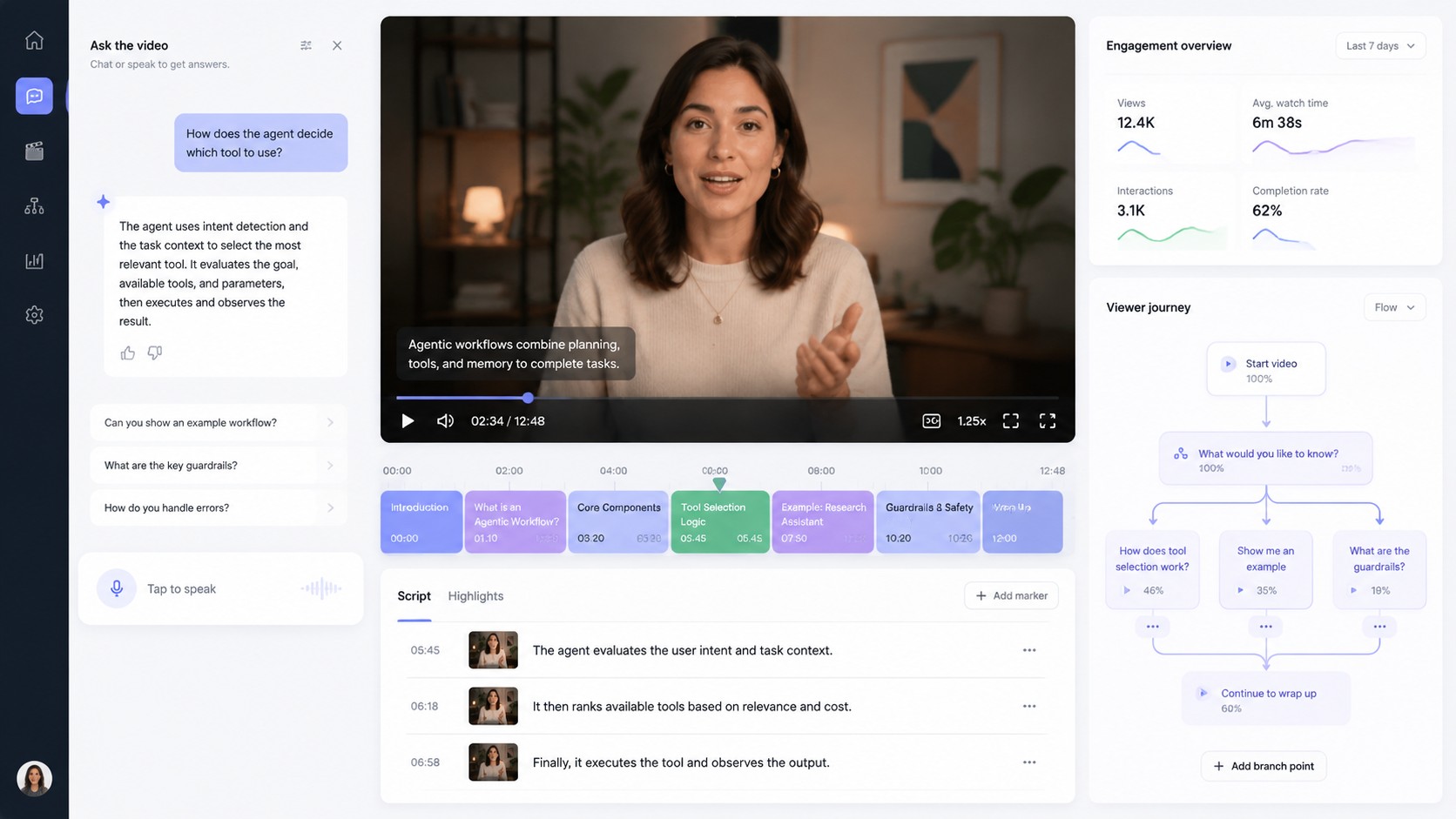
Agentic video generator workflows are shifting AI video from a finished clip into an interactive experience where viewers can ask questions, get contextual answers, and move through a video with help from an AI avatar or agent.
Why agentic video is becoming a search topic
D-ID announced Agentic Videos on April 23, 2026, describing a format that adds real-time AI agents to video so viewers can ask questions during and after playback. D-ID’s product notes frame the use cases around product marketing, learning and development, onboarding, support, and audience analytics.
This matters for Makefun because the same search intent sits between talking video, AI avatar generators, and all-in-one AI video workflows: users do not only want to create a clip, they want a video experience that can answer follow-up questions.
What an agentic video generator adds
- Interactive layer: a viewer can ask by chat or voice without leaving the video player.
- Script-grounded answers: the agent uses the video script and optional knowledge sources to respond in context.
- Avatar continuity: the same digital host can carry the experience from passive watching into conversation.
- Engagement analytics: creator teams can learn which topics trigger questions, confusion, or conversion intent.
Where it fits in a Makefun workflow
A practical Makefun-style workflow starts with a clear explainer video, avatar clip, or product walkthrough. The creator then plans which moments should invite questions, which knowledge base the agent should use, and which follow-up paths matter for sales, training, or support. This connects naturally to Makefun’s avatar API coverage and broader AI video generator trends.
For teams already experimenting with agent-driven creative tools, the agentic video idea also complements Makefun’s Runway MCP AI video workflow coverage: one side helps agents operate creative tools, while the other makes the finished video itself conversational.
Prompt and production checklist
- Define the viewer role: buyer, learner, new employee, support user, or creator.
- Write a video script that includes clear concepts, terms, and decision points.
- Mark timestamps where the viewer is likely to ask for detail or examples.
- Prepare allowed knowledge sources so the agent avoids unsupported answers.
- Use a consistent avatar voice, visual style, and response tone.
- Review analytics after launch and improve the script where questions repeat.
Source-backed market signals
D-ID’s launch post says Agentic Videos are available across subscription plans and integrate into the video player with a dedicated interaction layer. D-ID’s implementation guide says the feature is available through simpleshow video maker and uses the script as a primary knowledge base. Kaltura also announced agentic conversational avatars in March 2026, showing that enterprise video platforms are moving toward real-time, avatar-based interactions.
Cost and pricing comparison for agentic video workflows
Agentic video pricing should be planned around both the finished clip and the live response layer. D-ID’s API pricing page currently lists a free trial, then Build at $14.40/month annually with 64 credits, Launch at $35/month annually with 180 credits, Scale at $138.60/month annually with 800+ credits, and Enterprise as a custom plan. Those plans separate offline video minutes from streaming video minutes, so an embedded agent can become more expensive when viewers ask many follow-up questions instead of watching one static explainer.
For a same-use enterprise comparison, Kaltura Genies and Agentic Avatars are positioned around verified-content conversations and avatar responses inside enterprise video experiences, with enablement handled through a Kaltura representative rather than a self-serve creator plan. That makes Kaltura more relevant for governed training, support, and internal knowledge workflows, while D-ID is easier to estimate from public credit bundles.
The hidden cost drivers are response length, number of viewer turns, streaming minutes, avatar and voice-clone limits, watermark removal, S3 or storage requirements, faster processing tiers, human review of agent answers, and whether the same source video must be localized or personalized for many audiences. For Makefun-style planning, budget a short static avatar video separately from the interactive agent layer that answers questions after playback.
FAQ
What is an agentic video generator?
An agentic video generator creates or enhances video with an AI agent layer, so viewers can ask questions, request clarification, and receive answers while staying inside the video experience.
Is agentic video the same as text-to-video?
No. Text-to-video focuses on generating the clip. Agentic video focuses on what happens during viewing: conversation, context, personalization, and analytics.
Why should AI video creators care?
Interactive video can help product demos, training clips, onboarding videos, and support content answer viewer questions without forcing users to search elsewhere.
How should teams avoid risky claims?
Keep answers grounded in the script and approved knowledge sources, avoid unsupported product promises, and review logs for repeated gaps or inaccurate responses.
Further reading: D-ID launch announcement, D-ID Agentic Videos guide, and Kaltura agentic avatars announcement.


