
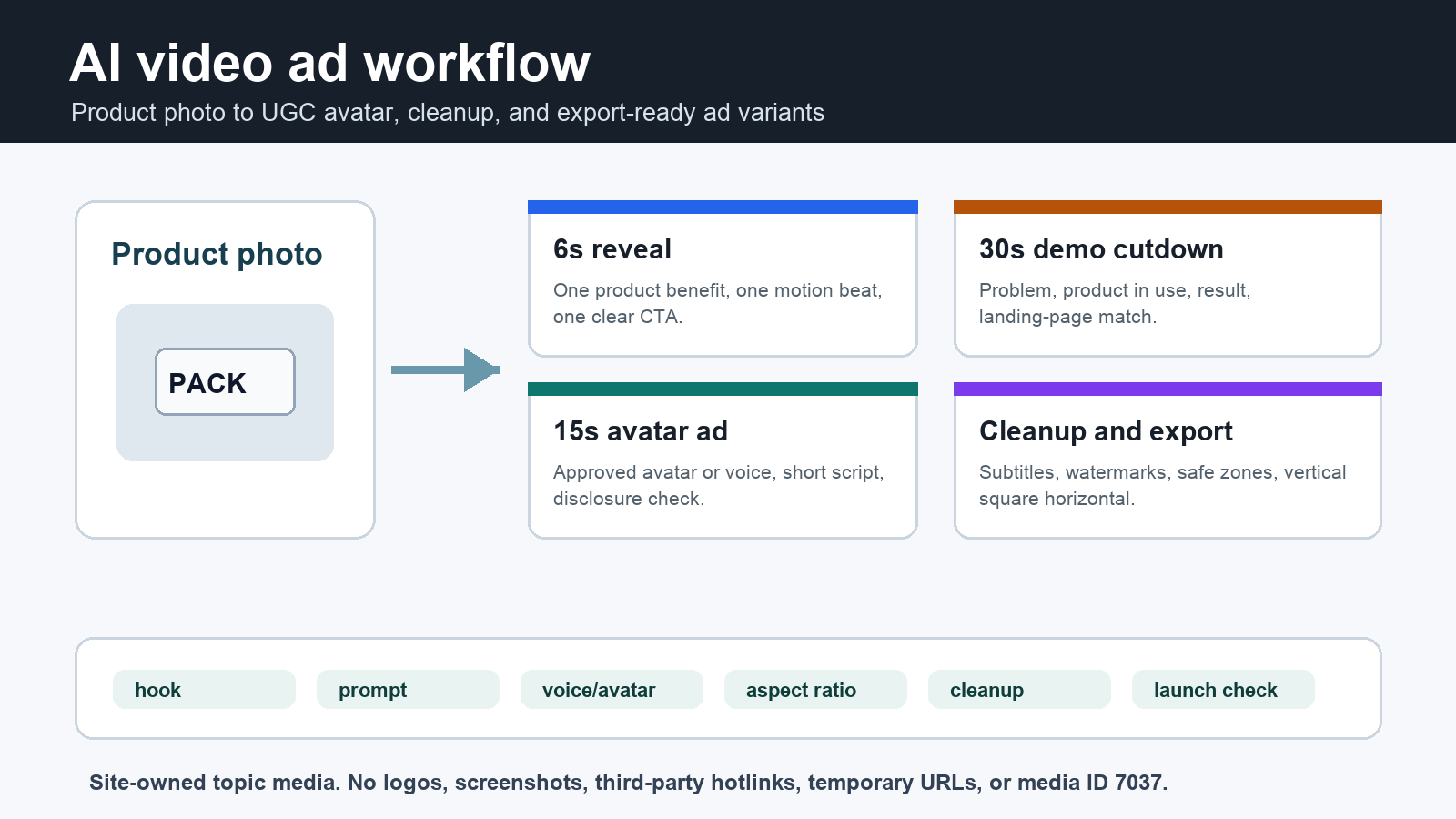
An AI video ad generator works best when you start with a product photo, write one tight hook, generate short motion or avatar variants, then clean captions, watermarks, and format issues before launch. Use the workflow below to plan 6-second, 15-second, and 30-second ads with Makefun routes for image-to-video, talking video, voice, subtitle cleanup, and watermark removal.
This is not a generic list of AI ad tools. The template is for creators, founders, ecommerce teams, and agencies that already have a product image, a script idea, or an approved avatar and need repeatable ad variants without filming a new demo every time.
Start with the ad job, not the tool
Before opening any generator, decide which ad job you are making. A product reveal, UGC-style avatar explainer, product demo cutdown, and reused-asset cleanup ad need different prompts, durations, disclosures, and export checks. Makefun’s image-to-video app is the fastest route when the source is a product photo. Use talking video and voice clone only when you have clear rights to the likeness and voice.
| Ad variant | Source asset | Prompt or script | Makefun route | Launch check |
|---|---|---|---|---|
| 6-second product reveal | Single product photo or packshot | Show the product filling frame, add one motion beat that proves the benefit, end on a clean CTA card. | Image to Video | Check that product, CTA, and legal text stay inside vertical, square, and horizontal safe areas. |
| 15-second UGC avatar explainer | Product photo plus approved presenter or avatar image | One problem sentence, one proof or demo sentence, and one CTA. Keep consent and disclosure records. | Talking Video | Confirm likeness rights, voice rights, AI disclosure needs, and no unsupported performance promises. |
| 30-second product demo cutdown | Product image set, existing clip, or storyboard frames | Scene 1 shows the pain point, scene 2 shows the product in use, scene 3 shows the result with CTA. | App Image to Video | Make sure the ad, claim, and landing page match the product shown. |
AI video ad workflow template
Fill one row before generating each ad. The fields prevent vague prompts and make review faster: source asset, target placement, hook angle, prompt or script, creation route, avatar or voice option, export format, cleanup step, and launch check.
| Field | What to write | Example |
|---|---|---|
| Hook angle | The one problem, transformation, or proof point the viewer should understand first. | “Show how the desk lamp removes glare in a night workspace.” |
| Prompt or script | Concrete motion, scene order, product behavior, CTA, duration, and aspect ratio. | “Start close on the product, tilt to show the light beam, cut to before/after, end with Try it today.” |
| Voice or avatar | Whether the ad needs narration, a presenter, or no voice at all. | “No presenter for the 6s ad; approved avatar for the 15s version.” |
| Cleanup step | What must be removed or checked before launch. | “Remove old subtitles and check the CTA card is not cropped.” |
| Launch check | Specs, safe zones, product claim, landing page match, rights, and disclosure. | “Vertical, square, and horizontal exports all keep the offer visible.” |
TikTok product image ad variant
For a TikTok product image to video ad, keep the workflow narrower than a generic product demo. Start with one clean product photo, choose a 9:16 frame, write the first three seconds as the hook, then reserve visible space for captions, price or offer text, and the final CTA card. Recheck TikTok Ads Manager specs and ad-format policy before launch because placement rules, safe-zone files, landing-page consistency, and ecommerce claim requirements can change.
| Step | What to prepare | Launch check |
|---|---|---|
| Source photo | Use an owned packshot or product image with enough margin for vertical motion. | No copied TikTok UI, creator likeness, trademark use, or unsupported before/after claim. |
| Hook and proof | Write one short opening line, one product proof beat, and one CTA end card. | The first three seconds make the product and benefit clear without promising approval or ROAS. |
| 9:16 safe zone | Generate a vertical cut first, then adapt square or horizontal exports only after review. | Captions, offer text, logo, product, and CTA stay clear of interface and caption safe areas. |
| Makefun cleanup | Use image-to-video for motion, then clean reused subtitles or authorized watermarks if needed. | The ad, landing page, product, price, claim, and disclosure language remain consistent. |
Export checks for social and video ads
Refresh official ad platform specs before launch. Google Ads documentation for video assets and video ad specs is useful as a current source for orientation, quality, format, and review constraints, but do not copy platform tables into your brief. Use the specs as a checklist: horizontal, vertical, and square versions should keep the product, offer, CTA, and required disclosures visible.
- Keep the product and CTA inside safe zones for every cutdown.
- Do not promise approval, ROAS, conversion lift, or policy compliance.
- Check that the landing page matches the product, price, claim, and offer shown in the ad.
- Save the source prompt, source image, avatar approval, voice approval, and final export name.
Clean captions, logos, and reused overlays before launch
Short ad variants often reuse clips from product demos, creator videos, or old campaigns. Before publishing, use Makefun’s subtitle remover for burned-in captions or translated overlays, and the watermark remover only for owned or authorized assets. Do not use cleanup tools to hide rights marks from third-party content.
When to use a model or API route
If the workflow becomes repeatable, move from one-off generation to a model or API route. Makefun users can compare creative options such as Seedance 2.0 Mini and OmniHuman 1.5, then route production teams to the AI video API or AI avatar API when batch creation, repeatability, or app integration matters.
FAQ
Can AI make video ads from one product photo?
Yes, but the brief should specify the product, motion, hook, duration, aspect ratio, and CTA before generation. Product-photo ads work best when the page also includes cleanup and export checks.
Should I use an avatar for UGC-style ads?
Use an avatar only when you have clear rights to the likeness and voice, and include disclosure or consent handling where required.
What should I check before launching an AI-generated ad?
Check official platform specs, safe zones, product-to-landing-page match, captions, watermarks, claims, CTA clarity, and whether the generated asset needs disclosure.


