
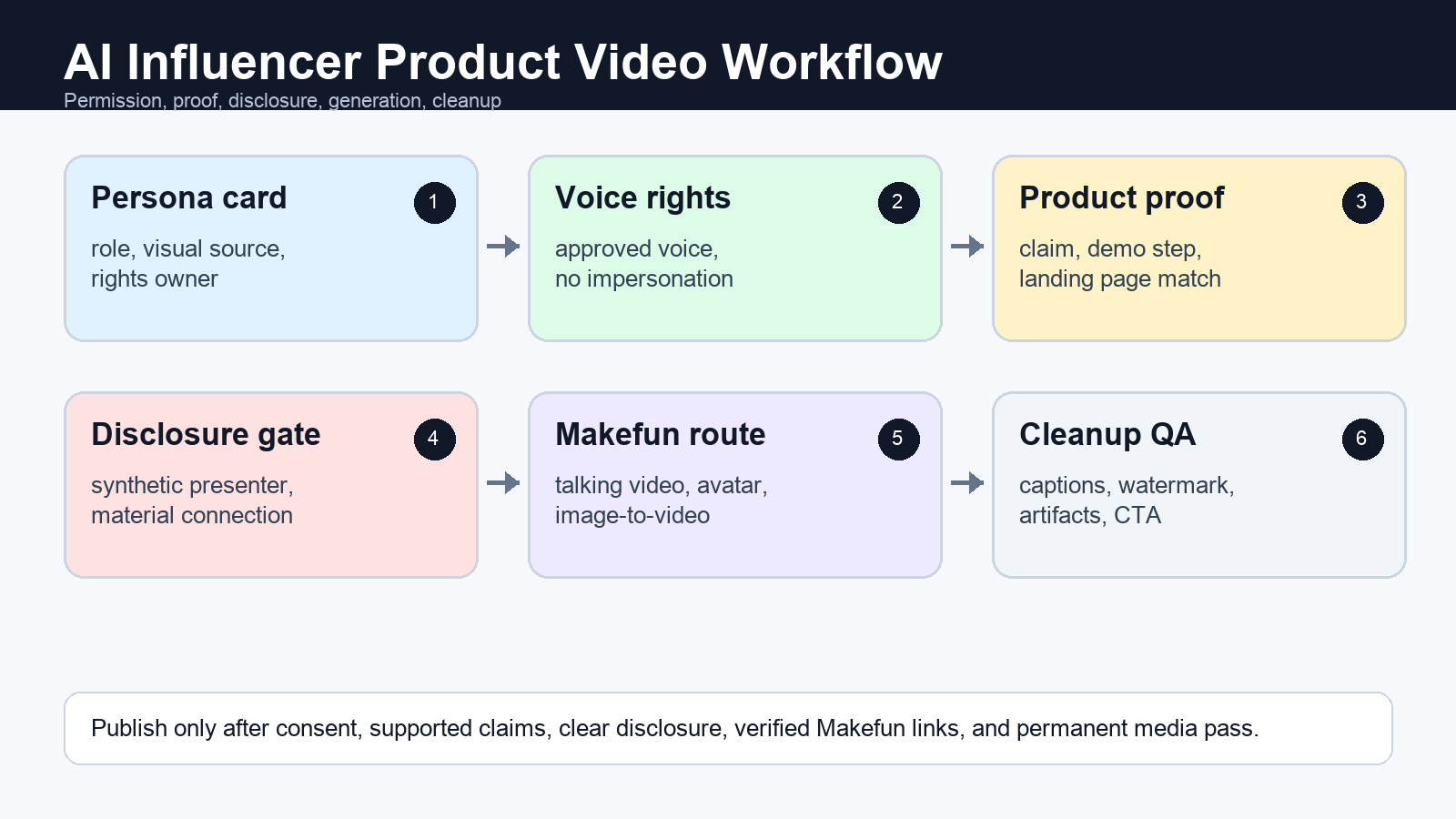
Short answer: an AI influencer generator should start with a permitted persona, product-proof record, consent and voice-rights checks, and a disclosure plan before any video is generated. Use Makefun to create the talking-video or product-video asset, then verify claims, labels, subtitles, watermarks, and landing-page match before publishing. Do not use the workflow to invent a customer endorsement, impersonate a real person, or hide a synthetic presenter.
Build the AI influencer around permission and proof
Treat the AI influencer as a controlled product-video presenter, not as a fake customer or undisclosed reviewer. Before generation, collect the persona rights, likeness source, voice permission, product claim proof, target CTA, and disclosure needs for the channel where the clip will appear.
In Makefun, that usually means routing the script to Talking Video, matching approved product visuals to Image to Video, and keeping the adjacent AI Avatar Video Generator workflow available when the source asset is a photo, script, and voice package.
Persona card: what the synthetic presenter may say
Create a persona record before writing the script. Include the persona name, role, visual source, rights owner, voice source, allowed topics, restricted claims, and disclosure status. Avoid celebrity, public-figure, employee, customer, or creator likenesses unless the approval path is documented.
| Field | What to record | Publish gate |
|---|---|---|
| Visual source | Owned avatar, licensed image, or approved brand asset | No public-figure or customer likeness without permission |
| Voice source | Recorded, licensed, or explicitly approved voice | Use Voice Clone only with rights |
| Persona role | Product guide, explainer, onboarding host, or support presenter | Do not frame the persona as a real buyer or reviewer |
Product proof row: avoid fake endorsement language
For every clip, attach one approved product fact, demo step, offer, or landing-page promise. Do not write lines such as “I used this” or “my results” unless a real authorized endorser made that statement and the material connection is disclosed. Match each CTA to the page used in the video: AI Video Ad Generator for ad concepts, AI Product Video Generator for product-photo demos, and pricing for plan questions.
Generation route map inside Makefun
| Use case | Source assets | Risk gate | Makefun route | Cleanup step |
|---|---|---|---|---|
| Product explainer host | Persona card, product fact, 20-45 second script | No fake customer claim; disclose synthetic presenter when realistic | Talking Video | Subtitle cleanup |
| Avatar FAQ | Approved avatar/photo, Q&A script, consent record | Likeness and voice permission required | AI Avatar Video Generator | Lip-sync review |
| Synthetic creator ad | Persona, product proof, offer, CTA, voice rights | Clear material-connection and AI disclosure decision | AI UGC Video Generator | Authorized watermark cleanup |
| Product demo narrator | Product image, demo script, landing-page claim | Claim proof and landing-page match required | Image to Video app | Caption and artifact QA |
| Support onboarding presenter | Help-center script, approved avatar, neutral CTA | Avoid impersonating employees or customers | Talking Video | Export framing and captions |
Disclosure and platform labeling gate
Refresh the official guidance for the channel before launching. The practical trigger is simple: realistic synthetic people, altered speech, endorsement-like wording, and material brand relationships need an explicit disclosure decision. FTC influencer guidance, YouTube’s GenAI disclosure help, Meta’s AI-labeling guidance, and Google’s people-first content guidance are useful source paths, but this page does not promise legal compliance, ad approval, platform approval, ROAS, or ranking outcomes.
- FTC endorsements, influencers, and reviews guidance
- FTC Disclosures 101 for social media influencers
- YouTube guidance on disclosing GenAI content
- Meta AI-content labeling guidance
- Google guidance on helpful, reliable, people-first content
AI influencer persona and disclosure worksheet
| Worksheet row | Publisher instruction |
|---|---|
| Persona card | Name the persona role, visual source, rights owner, allowed topics, restricted claims, and disclosure status. |
| Likeness and voice rights | Record whether the face, avatar, photo, and voice are owned, licensed, or explicitly approved. |
| Product proof | Attach one approved fact, demo step, offer, or landing-page promise the script may use. |
| Endorsement boundary | Mark whether the wording sounds like a testimonial, review, paid endorsement, or ordinary product explanation. |
| Makefun route | Choose Talking Video, AI Avatar, image-to-video, voice clone, subtitle remover, or watermark remover based on source assets. |
| Disclosure gate | Decide whether FTC, YouTube, Meta, or internal brand rules require visible synthetic-content or material-connection disclosure. |
| CTA and landing page | Match the call to action to the exact Makefun route or product page used in the article. |
| Cleanup QA | Check captions, watermarks, product labels, faces, hands, price claims, artifacts, and export framing before publication. |
QA checklist before export
Review likeness consent, voice rights, product claim support, disclosure text, platform label, caption accuracy, artifact cleanup, and landing-page match. Use subtitle remover for authorized burned-in subtitle or translation cleanup, and watermark remover only when the brand owns or is allowed to edit the asset. If cleanup would distort a face, product label, price, or safety claim, rebuild the clip from approved source assets instead of masking the issue.
FAQ
What is an AI influencer generator for product videos?
It is a workflow for creating a synthetic or avatar-led presenter around approved product proof, consent, voice rights, disclosure, and a Makefun generation route. It should not create fake customers or hidden endorsements.
What should I prepare before generating an AI influencer video?
Prepare a persona card, product proof row, approved script, voice permission, disclosure decision, target CTA, landing-page match, and cleanup checklist.
When does an AI influencer video need disclosure?
Refresh official sources before publication. A conservative editorial rule is to disclose realistic AI people, altered voices, material brand relationships, endorsement-like wording, and synthetic content that could affect viewer understanding.
Which Makefun tool should I use first?
Start with Talking Video for presenter clips, image-to-video for product motion, voice clone only with documented rights, and subtitle or watermark tools for authorized cleanup.


