
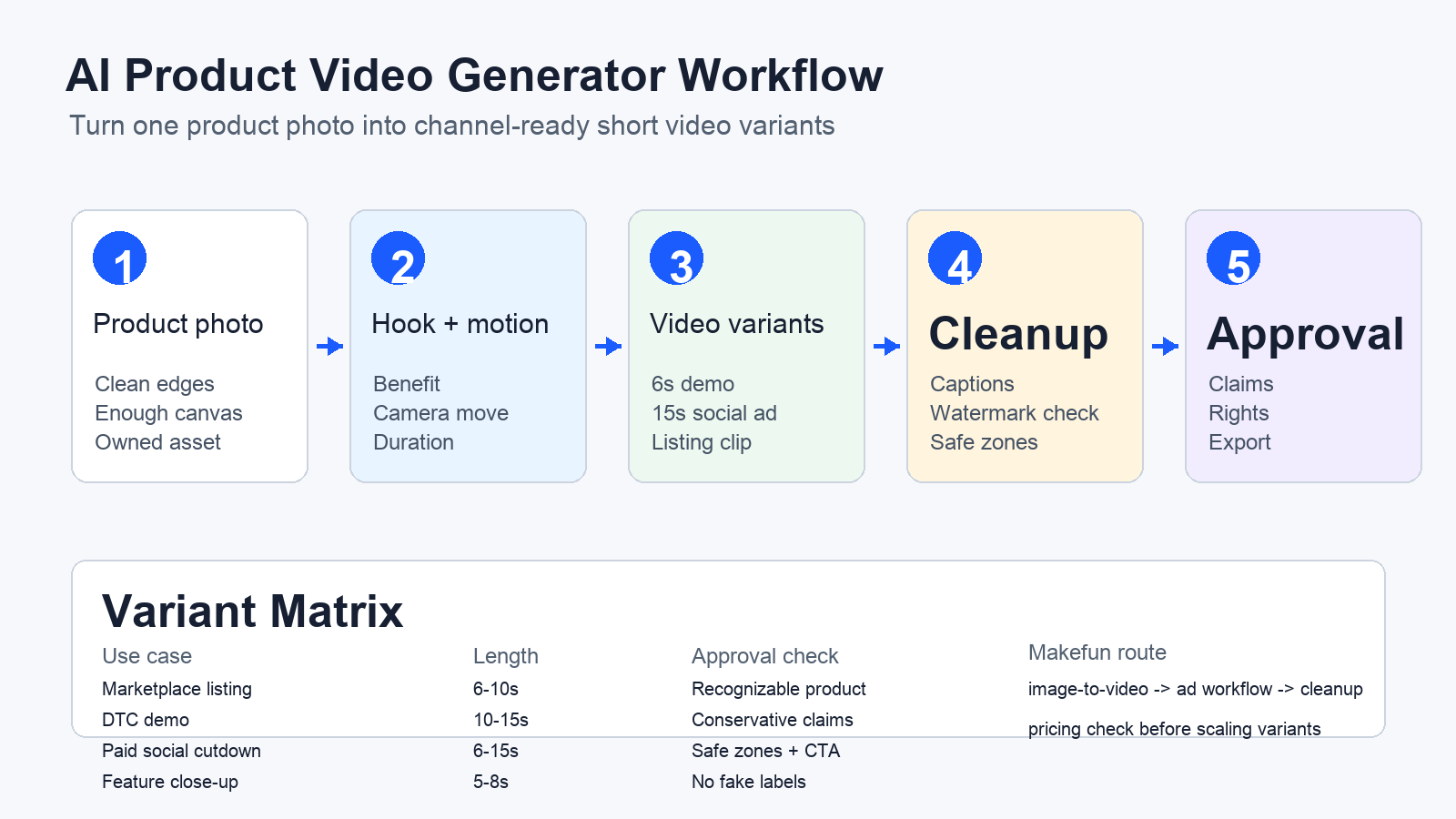
An AI product video generator turns one clean product photo into a short product demo, ecommerce listing clip, or paid-social ad by combining the image with a hook, motion direction, format, CTA, and cleanup checklist. For Makefun, the strongest workflow is: start with image-to-video, write the product claim conservatively, export TikTok/Reels/Shorts and marketplace variants, then use watermark or subtitle cleanup only on owned or licensed assets.
This guide is a practical worksheet for ecommerce teams that want to turn one owned product image into short video variants without drifting into unsupported ad claims.
Product Photo To 15-Second Ad Worksheet
| Step | Inputs | Decision |
|---|---|---|
| Source product photo | single main product, clean edges, enough canvas, no copied third-party lifestyle image | Use Makefun image-to-video if the product remains recognizable after a short motion test. |
| Hook and offer | one buyer problem, one benefit, one conservative claim, one CTA | Reject prompts that invent discounts, certifications, medical claims, or before-after promises the merchant cannot support. |
| Motion prompt | camera movement, background, lighting, duration, aspect ratio | Prefer simple motion and product focus over crowded scenes that distort the item. |
| Channel variant | TikTok/Reels/Shorts ratio, marketplace listing ratio, caption/text plan, safe zone | Create variants only after the base video passes product-recognition and claim checks. |
| Cleanup and approval | owned/licensed source, watermark/subtitle need, reviewer, retake budget | Use cleanup tools only for authorized assets and record the final approval owner. |
Start with Makefun image-to-video for the core product motion test, then use the AI video ad generator workflow for hooks, cuts, and channel variants.
Use-Case Matrix For Ecommerce Teams
| Use case | Best length | Source asset | Makefun route | Risk check |
|---|---|---|---|---|
| Marketplace listing video | 6-10 seconds | clean product image plus feature bullets | Open route | product must stay recognizable; claims must match listing copy |
| DTC product demo | 10-15 seconds | product photo, benefit, audience, CTA | Open route | avoid unsupported performance or safety claims |
| Paid social cutdown | 6-15 seconds | hook, offer, product image, channel format | Open route | refresh platform creative guidance before publication |
| Feature close-up | 5-8 seconds | macro product image or crop plus feature label | Open route | do not generate fake components, labels, certifications, or use results |
| Authorized cleanup/reuse | source-dependent | owned or licensed video needing caption/watermark/text cleanup | Open route | do not encourage removing third-party ownership or platform marks |
Prompt Templates For Product Videos
- Studio product spin: Animate this product photo into a clean 8-second studio product video. Keep the product centered and recognizable. Use a slow camera push, soft shadows, simple background, no extra logos, no unsupported text claims, and end with a clear product-focused frame.
- Benefit close-up: Turn this product photo into a 10-second feature close-up. Show the material, shape, and main benefit visually without adding fake labels or certifications. Use gentle motion, high clarity, and a final frame ready for a short CTA.
- Lifestyle scene: Create a 12-second product video in a realistic lifestyle setting using only generic props and no copied brand assets. Keep the product unchanged, avoid people unless the merchant owns likeness rights, and leave room for captions.
- Paid social cutdown: Create a 15-second vertical ad draft from this product photo. Start with a visual hook, show the product benefit, include space for short caption text, and finish with a CTA frame. Do not promise results or platform approval.
Channel And Source Checks Before Publishing Ads
Use official product and ad-platform documentation as context, not as a promise of platform approval or campaign performance. Refresh your product claim, offer, rights, and destination before turning a draft into a paid ad.
- Google Merchant Center Product Studio help shows that merchant product-image and product-video AI workflows are now a mainstream reference point.
- Google Product Studio developer documentation is useful market context for AI product content tooling.
- TikTok Ads best practices gives current short-form creative context.
Makefun Workflow Handoff
For model selection and broader planning, compare options in Best AI Video Generator 2026. For cleanup on owned or licensed media, use Watermark Remover or the subtitle remover app route. Check Makefun pricing before producing many variants.
FAQs
Can one product photo become a product video ad?
Yes, if the photo is clear and the workflow supplies a hook, motion prompt, format, CTA, and review step. The final ad still needs claim, rights, and platform checks before use.
What should ecommerce teams prepare before using an AI product video generator?
Prepare a clean product image, product benefit, offer, audience, aspect ratio, desired length, motion direction, brand-safety limits, and a reviewer who can approve product claims.
Should product videos include generated people or influencers?
Only when likeness, disclosure, and usage rights are clear. For most product-photo workflows, a product-only or generic lifestyle scene is safer and easier to approve.
Can watermarks or subtitles be removed from any product video?
No. Cleanup should be limited to videos the merchant owns, licenses, or is otherwise authorized to edit.


