
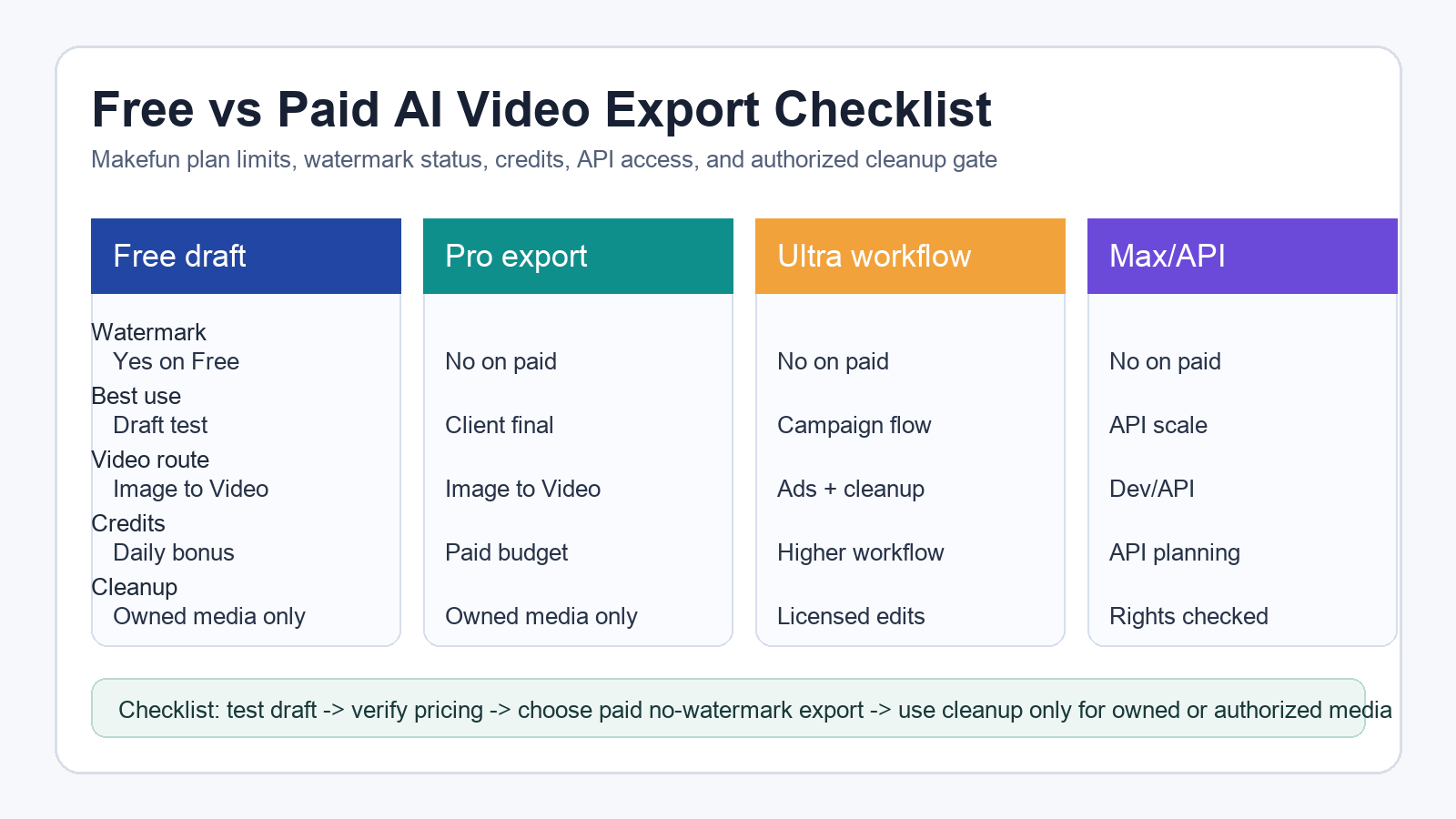
Quick answer: Makefun can work well as a free AI video generator for drafts, tests, and image-to-video workflow checks, but the current pricing boundary matters. As checked on June 24, 2026, the Free plan lists watermarks, while paid Pro, Ultra, and Max plans list no-watermark export. Use free credits to test the idea, then choose a paid export path for client-ready or public videos.
This guide is not a promise that every free export is watermark-free. It is a plan-limit and export checklist for creators, marketers, agencies, and developers who need to decide when a free draft is enough and when a final no-watermark asset requires a paid plan.
Free Drafts Are Different From Final Exports
The safest way to use a free AI video generator is to treat it as a testing lane. Start with Makefun Image to Video when you want to turn a product photo, scene still, or concept image into a short motion test. Use the result to compare prompt direction, composition, clip length, and whether the watermark is acceptable for an internal review.
For public ads, client deliverables, portfolio clips, ecommerce listings, or paid social posts, check Makefun pricing before you promise a no-watermark file. Current pricing evidence shows the Free plan with watermarks and paid plans with no-watermark export. If pricing changes later, use the pricing page as the source of truth.
Makefun Plan-Limit Matrix
| Decision row | Free draft | Pro export | Ultra workflow | Max/API-heavy workflow |
|---|---|---|---|---|
| Watermark status | Current Free row lists watermark | Paid no-watermark export | Paid no-watermark export | Paid no-watermark export |
| Best use | Prompt tests, drafts, and internal review | Short final clips and creator posts | Higher-volume campaign workflows | API or production-heavy evaluation |
| Starting route | App Image to Video | Image to Video | AI Video Ad Generator | Developer app |
| Selection help | Test one idea | Pick a final export path | Compare ad and product workflows | Review AI Video API needs |
| Cleanup gate | Owned or authorized media only | Owned or authorized media only | Licensed campaign assets only | Rights checked before scale |
Export Checklist Before You Promise No Watermark
- Open the current pricing page and confirm the Free, Pro, Ultra, and Max watermark rows.
- Estimate the credits you need for the clip length, video route, and number of retries.
- Create a free draft first when you only need direction, timing, or prompt validation.
- Use a paid no-watermark export for client, public, ad, marketplace, or portfolio delivery.
- Save the final exported asset and source prompt so the team can reproduce the result.
- Use watermark or subtitle cleanup only for content you own, license, or are authorized to edit.
Best Makefun Route By Use Case
If you have a product photo or campaign image, start with Image to Video. If the job is a performance ad, use the AI Video Ad Generator workflow to plan product proof, scene hooks, CTA, and social-safe framing. If you are still comparing tools or models, use Best AI Video Generator 2026 as a selector instead of turning this page into a generic list.
Developers and production teams should separate creative testing from API evaluation. Review Makefun developer access and the AI Video API path when you need repeatable generation, integration planning, or a higher-volume export workflow.
When Cleanup Is Appropriate
Watermark and subtitle tools should not be framed as a way to bypass third-party rights marks, creator attribution, platform marks, or copyright notices. Use Watermark Remover, Remove Subtitles From Video, or the Subtitle Remover app only for media you own, license, or have permission to edit.
Good use cases include internal drafts, licensed product footage, brand-safe edits, old campaign assets, hardcoded captions in your own videos, and legitimate post-production cleanup. Bad use cases include removing marks from someone else’s video so it looks like your own.
FAQ
Can I export AI videos without a watermark for free?
Use the current Makefun pricing page as the source of truth. As checked for this article, free generation is a watermarked draft path and paid plans list no-watermark export.
Which tool should I start with?
Start with Image to Video for product or photo-based clips, use AI Video Ad Generator for campaign concepts, and use pricing plus developer routes when export limits or API evaluation matter.
Can I remove a watermark from any video?
No. Cleanup tools should be used only for owned, licensed, or authorized media. Do not use them to remove third-party rights marks, platform marks, creator marks, or copyright notices.
Sources Checked
- Makefun Pricing for Free watermark and paid no-watermark plan rows.
- Makefun Image to Video for the primary product route.
- Makefun Watermark Remover for authorized cleanup routing.
- Google Search Central helpful content guidance for transparent, useful article framing.


