
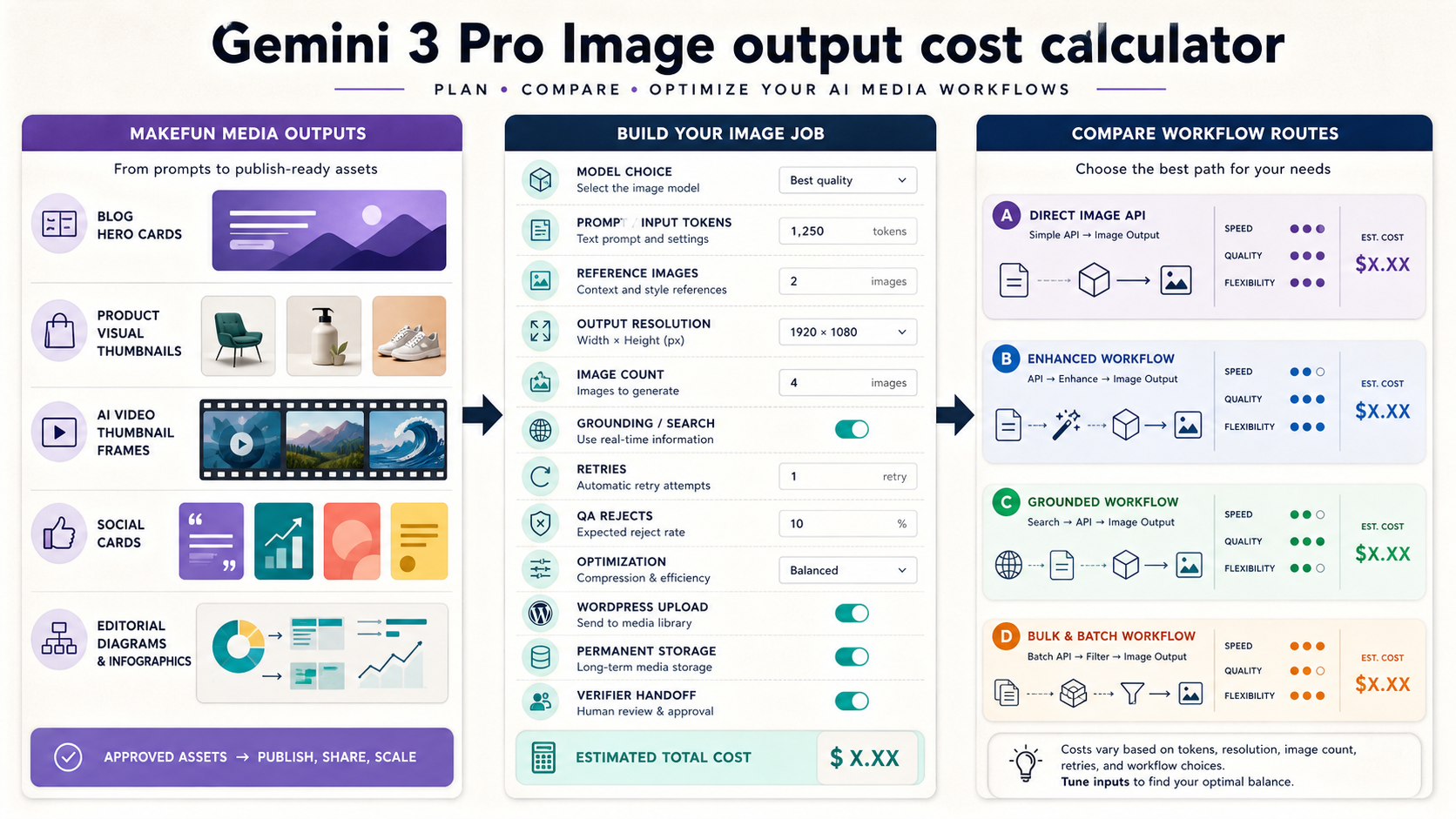
Short answer: Gemini 3 Pro Image cost planning should not stop at a headline price per image. For a Makefun media workflow, model the approved asset count, candidate generations, text and image inputs, output resolution, grounding queries, retry rate, QA rejects, optimization, WordPress upload, permanent storage, and verification handoff as separate rows.
This calculator is for teams producing blog heroes, product visuals, AI video thumbnails, social cards, and editorial diagrams. It keeps the page cost-led and workflow-led, not a generic Nano Banana prompt guide or a broad image-model ranking.
Gemini image output pricing starts with resolution and model choice
Publication-time checks on June 24, 2026 found the official Gemini Developer API pricing, Gemini 3 guide, and Google Cloud Gemini image generation docs available with HTTP 200 responses. The official docs identify Nano Banana Pro as Gemini 3 Pro Image and Nano Banana 2 as Gemini 3.1 Flash Image, and list Gemini image generation model IDs for Agent Platform workflows.
Use the current Google rows as a source snapshot, then calculate your own Makefun workload. At publication time, Gemini 3 Pro Image standard pricing listed text/image input, text/thinking output, image output, and Google Search grounding as separate meters. The image-output row showed 1K/2K and 4K image equivalents, while grounding remained a separate search-query exposure after the shared free allowance.
Calculator rows for one Makefun media library
| Row | What to enter | Why it changes cost |
|---|---|---|
| Approved assets | Final blog heroes, product visuals, thumbnails, social cards, and diagrams. | This is the unit you actually publish, so every provider should be normalized to cost per approved asset. |
| Candidate outputs | Images generated before review, including alternates and crop variants. | Rejected candidates still consume image-output budget. |
| Input tokens and references | Prompt text, reference images, product source frames, and diagram instructions. | Complex briefs can add text/image input exposure before any final image exists. |
| Resolution | 1K/2K for most article assets; 4K only when text, diagrams, or future crops require it. | Higher-resolution output changes the image-output equivalent and can increase retry waste. |
| Grounding | Search or image grounding prompts used for current facts, charts, product references, or diagrams. | Google lists grounding separately from normal image output; do not hide it inside the image row. |
| QA and retries | Text fixes, brand consistency misses, product accuracy rejects, aspect-ratio failures, and human review. | This is where a cheap-looking generation route often becomes expensive per approved asset. |
| Publication handoff | Compression, alt text, social crop, WordPress media registration, canonical checks, cache checks, and rollback owner. | Model output is not a finished Makefun asset until the permanent media path is verified. |
Same-workload formula
Use this worksheet formula before choosing a route:
- Generated candidates = approved assets x candidates per approved asset x (1 + retry rate + QA reject rate).
- Model cost = input exposure + image-output exposure by resolution + text/thinking output + grounding/search queries.
- Published asset cost = model cost + optimization time + WordPress media handoff + review time + storage/backup overhead.
For a monthly Makefun library, repeat those rows for blog heroes, product visuals, video thumbnails, social cards, and editorial diagrams. The result is more useful than comparing raw token, image, credit, or second prices.
Gemini 3 Pro Image vs Gemini 3.1 Flash Image
Do not compare these routes by a single headline row. Keep the prompt, references, approval threshold, output resolution, and review rules the same. Then compare which meter dominates: image output, input references, grounding, retries, QA rejects, or handoff time.
At publication time, the official pricing page positioned Gemini 3.1 Flash Image as the speed and efficiency route and Gemini 3 Pro Image as the native image generation route with stronger contextual understanding. That positioning is useful for routing, but it is not enough to claim either model is universally cheaper, better, faster, or safer for every Makefun workload.
Makefun workflow routes
Use Gemini image output when it supports a specific Makefun production job: article graphics, product source frames, ad thumbnails, or diagrams that later feed Makefun image to video, AI video API, or an internal publication workflow. For adjacent API budgeting, compare with the verified Makefun pages for Gemini Batch API context cache cost, Gemini Live API session cost, Runware video API routing, and fal video API routing.
Avoid linking the calculator to pages that are not live. In this publish run, several adjacent image-cost URLs returned 404 and were left as plain comparison concepts rather than body links.
Controls before publishing generated images
- Keep source prompts and reference media with the post package.
- Use permanent WordPress media, never a temporary generation URL or third-party hotlink.
- Write descriptive alt text before the post goes live.
- Check social image, canonical, cache-busted HTML, and sitemap state after publish.
- Keep the article a calculator; do not turn it into a broad vendor ranking without same-date same-workload evidence.
FAQ
What is the main Gemini 3 Pro Image cost unit?
Use image output and resolution as the primary meter, then add text/image input, text/thinking output, grounding/search queries, retries, QA rejects, optimization, storage, and publication handoff as separate rows.
Should Makefun compare Gemini 3 Pro Image with Gemini 3.1 Flash Image?
Yes, but only by same workload. Use the same prompt, references, approved asset target, resolution, retry rate, and review threshold.
Do grounding and web or image search affect cost?
They can. Add a separate grounding/search row whenever the prompt needs current facts, product references, charts, or source-backed diagrams.
Is Gemini 3 Pro Image cheaper than GPT image, FLUX.2, or Recraft?
Do not answer from headline rows. Normalize each route to approved permanent Makefun assets, including retries, review, storage, optimization, and publication work.


