
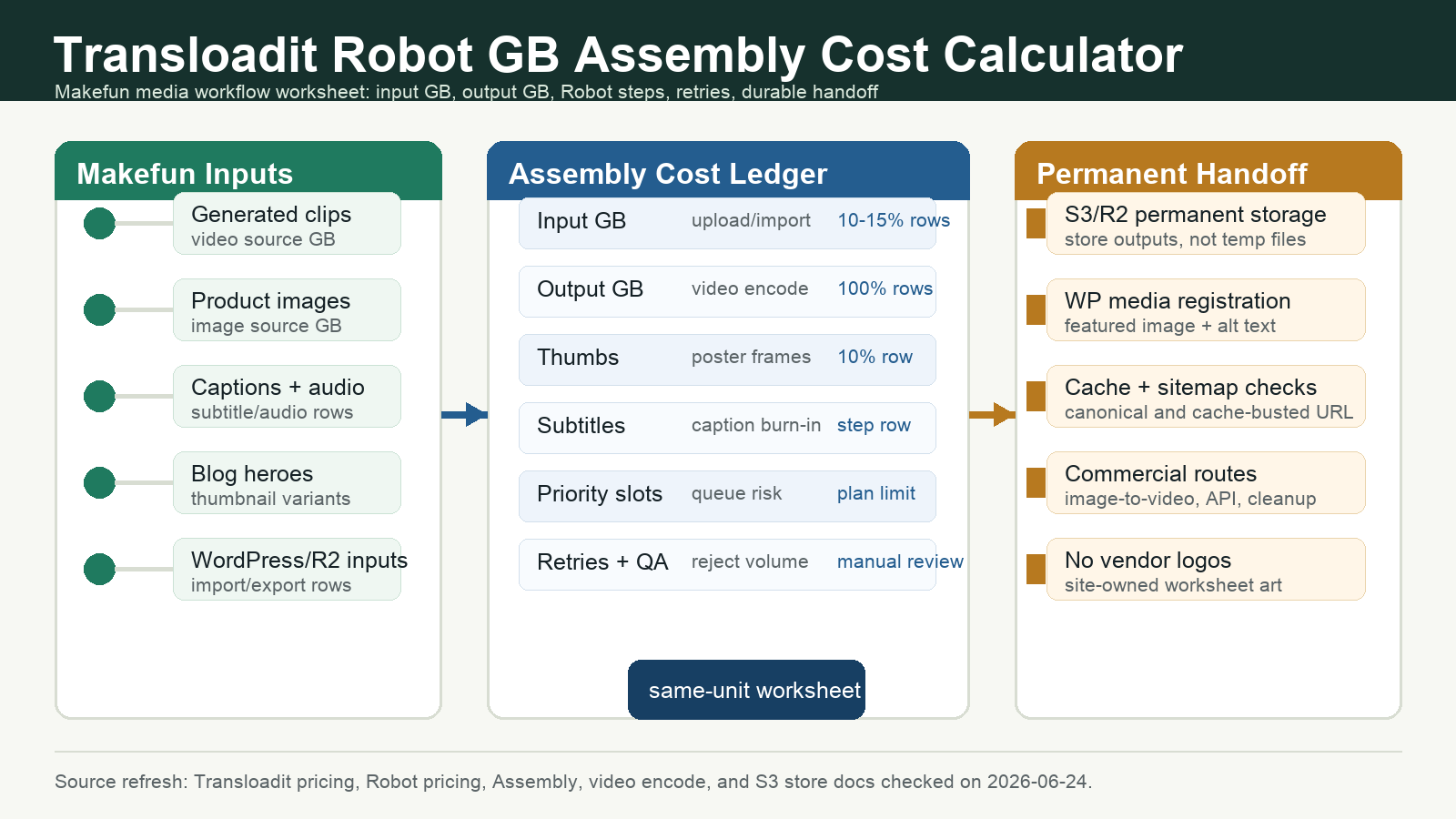
Short answer: a Transloadit pricing calculator should not price a media workflow by job count alone. For Makefun-style publishing, model source input GB, every Robot output GB, Robot byte percentages, priority slots, file-size limits, retries, QA rejects, and the final S3/R2 or WordPress handoff before comparing Transloadit with hosted video, image transformation, render APIs, or self-managed workers.
Source refresh: the official Transloadit pricing page, Robot pricing docs, Assembly Instructions, Robots index, video encode Robot docs, and S3 store Robot docs were checked on 2026-06-24. Pricing and limits can change, so treat the worksheet as a planning structure and confirm current plan rows before a purchase decision.

What To Count First
Transloadit Assemblies are step chains. A single workflow can import a source file, encode video, create thumbnails, add captions, process audio or images, export the finished assets, and return status JSON. That means the calculator needs rows for both the original media and the generated outputs, not one flat request number.
- Source GB: uploads, HTTP imports, S3/R2-compatible imports, existing WordPress assets, and source files retried after failure.
- Output GB: encoded videos, adaptive streaming renditions, posters, thumbnails, subtitle outputs, audio derivatives, and image variants.
- Robot byte percentage: import, upload, encode, thumbnail, subtitle, export, and document/image/audio steps can carry different byte assumptions.
- Plan controls: included monthly GB, overage GB, priority job slots, file-size limits, seats, and spending guardrails.
- Publication handoff: S3/R2 storage, WordPress media registration, featured image selection, alt text, cache checks, and editorial QA.
Makefun Media Workflow Scenarios
Use the calculator when a generated asset still needs normalization before it becomes a durable site asset. For example, a Makefun image-to-video workflow may create source clips, posters, short social cuts, and blog media. A developer workflow may route finished media through the AI video API, then register the final file in WordPress or R2. A cleanup workflow may also need watermark removal or subtitle removal before publication.
| Scenario | Rows to include | Decision risk |
|---|---|---|
| Blog media normalization | Source clips, encode output, posters, captions, R2 export, WordPress media registration | Missing thumbnail and storage rows can understate publication cost. |
| Product tutorial pack | Longer source videos, 1080p output, thumbnail set, subtitle row, manual QA | Retries and file-size limits can matter as much as base GB. |
| Creator social derivatives | Multiple aspect ratios, short clips, platform posters, exported copies | Output variants can multiply the same source media. |
| Self-managed alternative | R2 storage, FFmpeg or Sharp workers, queue monitoring, cache checks, editorial time | Compute may look cheaper until maintenance and QA are counted. |
Same-Unit Comparison Matrix
Keep comparisons same-unit. Do not compare Transloadit GB rows with another provider’s minute, credit, request, or storage line unless the worksheet uses the same source file, output volume, retry rate, and handoff rules. Adjacent Makefun cost pages that help normalize the model include the Cloudinary AI Transformation Credit Cost Calculator, Imgix AI Transformation Credit Delivery Cost Calculator, Cloudflare R2 Images Stream Media Cost Calculator, and Runpod Serverless GPU Worker Idle Timeout Cost Calculator. Mux, Creatomate, Shotstack, Cloudflare Stream, direct WordPress media, and R2 plus FFmpeg/Sharp workers can be mentioned as alternatives only after their units are normalized.
| Option | Native unit | Normalize with |
|---|---|---|
| Transloadit | Input and output GB by Robot Step | Robot percentage, plan GB, priority slots, import/export rows |
| Hosted video platforms | Minutes, storage, delivery, add-ons | Uploaded minutes, stored minutes, delivered minutes, caption jobs |
| Image transformation platforms | Credits, transformations, storage, delivery | Asset count, transformations per asset, delivery GB, cache behavior |
| Render APIs | Render minutes or credits | Output seconds, template variants, rerenders, webhook retries |
| R2 plus workers | Storage, operations, compute time | Worker runtime, queue monitoring, egress, maintenance, QA |
Publisher Checklist
- Refresh Transloadit pricing and Robot docs before using numeric plan rows.
- Label every source-date-sensitive claim and avoid cheapest, fastest, best, security, privacy, or reliability claims without same-scenario evidence.
- Use live Makefun links only; keep unpublished adjacent packages as non-linked mentions.
- Export finished media to permanent storage and register the WordPress media item with alt text.
- After publishing, verify category
blogid2, featured media, Yoast fields, canonical URL, cache-busted URL, sitemap inclusion, and body links.
Official Sources
- Transloadit Pricing
- Transloadit Robot Pricing
- Transloadit Documentation
- Transloadit Assembly Instructions
- Transloadit Robots
- Transloadit Video Encode Robot
- Transloadit S3 Store Robot
FAQ
Is Transloadit priced only by the number of jobs?
No. Job count is not enough for planning. The useful worksheet separates source GB, output GB, Robot byte percentages, retry volume, priority slots, file-size limits, and export/storage handoff.
When should Makefun use a hosted media workflow instead of self-managed workers?
Use a hosted workflow when the operational value of managed imports, encodes, thumbnails, subtitles, retries, and export status is higher than maintaining your own queue. Use self-managed workers when the workload is stable, the team owns the operations burden, and QA plus storage handoff are already automated.
Can this calculator choose the cheapest option?
It can narrow the options, but it should not claim a universal cheapest provider. The right comparison depends on source GB, output formats, retry rate, storage, delivery, editorial QA, and how the final media is published.


